
Check Any Hyundai With Our Free VIN Decoder
Use our free Hyundai VIN Decoder to verify the model year, trim, engine, drivetrain, transmission, MSRP, and other factory specifications. If you need accident history, title records, mileage, or theft information, upgrade to the full vehicle history report.
What is a Hyundai VIN?
A Hyundai VIN, or Vehicle Identification Number, is a unique 17-character code assigned to every Hyundai during production. It works as the vehicle’s official identity to distinguish one from another, even though it has the same year, model, and trim.
The VIN contains details such as the country of manufacture, model line (Elantra, Sonata, Tucson, Santa Fe, Palisade, Ioniq, etc.), engine type, trim level, production year, assembly plant, and serial number. Since Hyundai models often come in multiple trims with different engines, hybrid systems, or technology packages, the VIN helps identify one exact vehicle from thousands produced each year.
What Does Our Hyundai Free VIN Decoder Show?
Our free Hyundai VIN Decoder reads all 17 characters to display exactly how your Hyundai was built at the factory. Here’s what you’ll get at no cost:
Model Year
Confirm the exact production year. This was critical for emissions, parts, and recalls.
Exact Model
Elantra, Sonata, Tucson, Santa Fe, Palisade, Kona, IONIQ 5, IONIQ 6, Venue, Nexo, and more.
Trim Level
SE, SEL, N Line, Limited, Calligraphy, or performance trims like Elantra N or Kona N.
Engine Specifications
Smartstream G1.6T, 2.0L Nu, 2.5L Theta-III, 3.8L Lambda V6, or EV powertrain details for IONIQ models.
Transmission
6-speed manual, 8-speed automatic, 7-speed DCT, or CVT.
Drivetrain
Check whether the Hyundai has FWD, AWD, or HTRAC All-Wheel Drive (Hyundai's intelligent AWD system).
Country of Origin
Check whether the Hyundai vehicle came from South Korea or the U.S.
Original MSRP
The manufacturer's suggested retail price when new.
Estimated Market Value
See the current value range based on decoded specs and market trends.
Where to Find the VIN on a Hyundai?
Finding the VIN on a Hyundai is simple. You can check both the vehicle itself and its official paperwork. Below are the most common locations.
On the Vehicle’s Body
Inspect the following areas carefully:
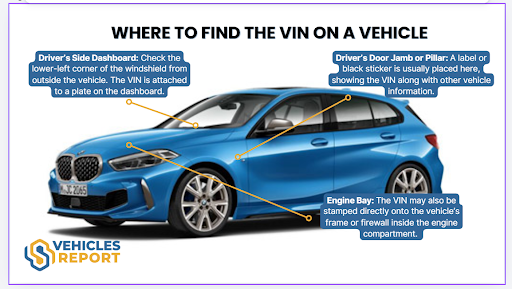
- Driver’s Side Dashboard: Look at the lower-left corner of the windshield on the driver’s side. The VIN is visible from outside where the dashboard meets the glass.
- Driver’s Door Jamb or Pillar: Open the driver’s door and check the certification label attached to the door frame. This sticker includes the VIN along with weight and manufacturing details.
- Engine Compartment: On some Hyundai models, the VIN may also be stamped onto the firewall or inner fender area inside the engine bay.
If You Don't Have Physical Access to the Vehicle
If the Hyundai isn't in front of you, grab one of these documents; they all display the VIN:
- Vehicle Registration: the state-issued card always lists the VIN.
- Vehicle Title: the legal ownership document shows the VIN.
- Insurance Card: your proof of insurance includes the VIN.
- Service & Maintenance Records: dealership or shop invoices have the VIN printed on them.
How to Decode the Hyundai VIN?
To decode the Hyundai VIN, you can follow these simple steps below.
Find the VIN
Check on the vehicle’s doorjamb or on its paperwork. If you can’t find it, ask the seller.
Fill in the Form
Once you have the VIN, click on the form above and then click on the button.
Get the Report
Examine the preview page where you can see the car’s complete specifications information. Need more data? Proceed to payment to get the vehicle report.
Why Decoding the VIN Is Important
A Hyundai VIN plays an important role for buyers, sellers, insurers, and vehicle owners. Here are the reasons why a VIN decoder is one of the crucial things to do before purchasing a used Hyundai.
For Buyers
A VIN decoder allows buyers to verify core vehicle details before committing to a purchase. It provides insight into factory specifications and production data that may not be obvious from a listing alone.
Confirm Vehicle Specifications
Review the trim level, engine type, drivetrain, and model year to ensure the vehicle matches your expectations.
Reduce Purchase Risks
Cross-check vehicle details against seller claims to avoid misrepresentation or undisclosed issues.
How to Read a Hyundai VIN?
The 17-character VIN is divided into three main sections: WMI, VDS, and VIS. Each section provides specific details about the vehicle’s origin, specifications, and production data.
WMI (WMI (World Manufacturer Identifier))
Characters 1–3: KM8
- K = Country of origin: South Korea
- M8 = Manufacturer: Hyundai Motor Company
VDS (VDS (Vehicle Descriptor Section))
4–9 characters: K23AG3
- K2 = Model line: Hyundai Kona
- 3 = Body style: 4-door crossover or SUV
- A = Engine type: 2.0L 4-cylinder
- G = Restraint or safety system
- 3 = Check digit used to validate the VIN
VIS (VIS (Vehicle Identifier Section))
10–17 characters: LU074313
- L = Model year: 2020
- U = Assembly plant: Ulsan, South Korea
- 074313 = Sequential production number unique to the vehicle
Decode Classic Hyundai VINs
Before 1980, the Hyundai Motor Company was in its foundational era and produced only a handful of vehicles. These early models consisted of vehicles built under a partnership with Ford, alongside Hyundai's very first independently developed cars. However, Hyundai began selling cars in the United States in 1986.
Early models like the Excel, Pony (sold outside the U.S.), and first-generation Hyundai used VIN formats that may differ slightly from today's standardized 17-character system. Our Hyundai VIN Decoder supports many classic Hyundai VIN formats, making it easier to identify factory specifications for vintage models.
Need more? Get a Hyundai Vehicle History Report
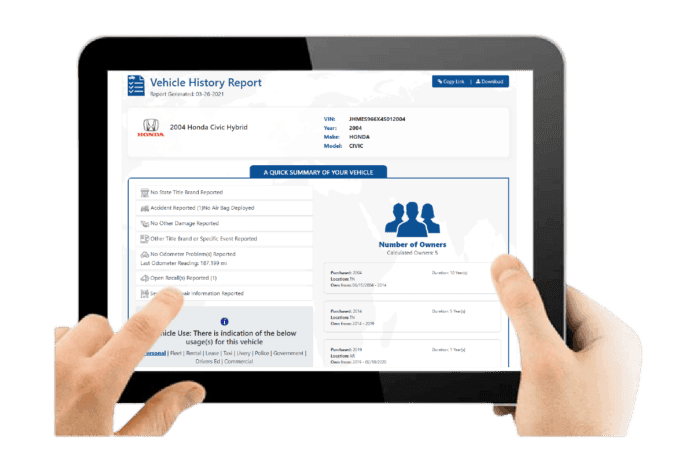
After decoding the VIN, you will receive a detailed Hyundai vehicle history report covering essential background information before purchase.
Vehicle Specifications
This section outlines the Hyundai’s original factory configuration to confirm performance, fuel efficiency, trim features, and overall suitability for daily commuting or family use.
Core Vehicle Configuration
Includes engine type, fuel type, drivetrain such as FWD or AWD, country of origin, and trim level.
Production and Pricing Details
Displays model year, assembly plant, and original MSRP to verify factory specifications.
Core Vehicle Configuration
Includes engine type, fuel type, drivetrain such as FWD or AWD, country of origin, and trim level.
Production and Pricing Details
Displays model year, assembly plant, and original MSRP to verify factory specifications.
Damage Records
Damage records reveal previously reported incidents that may affect structural integrity, safety systems, or overall reliability.
Collision and Structural Damage
Identifies accident-related damage that could impact frame structure or vehicle alignment.
Fire and Environmental Damage
Shows flood, fire, hail, or other environmental incidents recorded under the VIN.
Collision and Structural Damage
Identifies accident-related damage that could impact frame structure or vehicle alignment.
Fire and Environmental Damage
Shows flood, fire, hail, or other environmental incidents recorded under the VIN.
Accident Records
Accident history provides documented collision events that may influence safety performance and long-term durability.
Accident Dates and Locations
Lists when accidents occurred and where they were officially reported.
Structural and Safety Indicators
Highlights potential repair areas that may affect driving stability and occupant protection systems.
Accident Dates and Locations
Lists when accidents occurred and where they were officially reported.
Structural and Safety Indicators
Highlights potential repair areas that may affect driving stability and occupant protection systems.
Stolen Records
This check confirms whether the Hyundai has ever been reported stolen, helping reduce legal and financial risks.
Theft Status Verification
Confirms past or current stolen vehicle reports linked to the VIN.
Theft Record Details
Provides reported theft dates and locations for verification purposes.
Theft Status Verification
Confirms past or current stolen vehicle reports linked to the VIN.
Theft Record Details
Provides reported theft dates and locations for verification purposes.
Auction History
Auction history shows whether the Hyundai was previously sold through wholesale channels due to trade-ins, repossession, lease returns, or damage.
Auction Sale Records
Displays auction dates, locations, and final sale prices.
Condition Reports and Photos
May include listed vehicle condition summaries and archived auction images when available.
Auction Sale Records
Displays auction dates, locations, and final sale prices.
Condition Reports and Photos
May include listed vehicle condition summaries and archived auction images when available.
Sales History
Sales records track listing activity over time, helping identify repeated resale attempts or pricing inconsistencies.
Listing and Sale Timeline
Shows when the Hyundai was listed, sold, or relisted.
Resale Activity Patterns
Highlights short-term listing cycles that may suggest underlying issues.
Listing and Sale Timeline
Shows when the Hyundai was listed, sold, or relisted.
Resale Activity Patterns
Highlights short-term listing cycles that may suggest underlying issues.
Service and Maintenance Records
Service history demonstrates how consistently the Hyundai was maintained, which is essential for reliability and long-term performance.
Routine Service Documentation
Includes oil changes, scheduled maintenance, and service dates.
Repair and Maintenance History
Shows documented repairs and replacement of major components such as transmission, engine parts, or braking systems.
Routine Service Documentation
Includes oil changes, scheduled maintenance, and service dates.
Repair and Maintenance History
Shows documented repairs and replacement of major components such as transmission, engine parts, or braking systems.
Title Check
The title check verifies the Hyundai’s legal status and identifies branding that may affect resale value or registration.
Title Status Confirmation
Indicates whether the title is clean or branded.
Branded Title Details
Flags salvage, rebuilt, flood-damaged, or lemon designations in official records.
Title Status Confirmation
Indicates whether the title is clean or branded.
Branded Title Details
Flags salvage, rebuilt, flood-damaged, or lemon designations in official records.
Mileage History
Mileage records provide historical odometer readings to confirm usage patterns and detect possible discrepancies.
Recorded Odometer Entries
Displays mileage readings with corresponding reporting dates.
Rollback Detection Indicators
Helps identify irregular mileage patterns or potential odometer tampering.
Recorded Odometer Entries
Displays mileage readings with corresponding reporting dates.
Rollback Detection Indicators
Helps identify irregular mileage patterns or potential odometer tampering.
Lien or Loan Check
This section identifies outstanding financial obligations that could affect ownership transfer.
Active Lien Status
Confirms whether a lender holds a legal claim on the vehicle.
Outstanding Loan Details
Shows unpaid balances that must be settled before completing the transaction.
Active Lien Status
Confirms whether a lender holds a legal claim on the vehicle.
Outstanding Loan Details
Shows unpaid balances that must be settled before completing the transaction.
Ownership Records
Ownership history outlines how many individuals previously owned the Hyundai and how frequently it changed hands.
Number of Previous Owners
Indicates total recorded owners associated with the VIN.
Ownership Duration and Region
Shows ownership length and registration regions while protecting personal data.
Number of Previous Owners
Indicates total recorded owners associated with the VIN.
Ownership Duration and Region
Shows ownership length and registration regions while protecting personal data.
Recall Information
Recall information confirms whether Hyundai has issued safety-related recalls and whether corrective actions were completed.
Recall Notice Details
Lists recall dates, affected components, and reasons for issuance.
Repair Completion Status
Confirms whether recall-related repairs were completed and properly documented.
Recall Notice Details
Lists recall dates, affected components, and reasons for issuance.
Repair Completion Status
Confirms whether recall-related repairs were completed and properly documented.
Why Users Trust Our Hyundai VIN Decoder?
Buying or selling a Hyundai without reviewing its background can lead to unexpected expenses. Our Hyundai VIN Decoder provides verified factory specifications and comprehensive vehicle history records, helping you make a more informed decision.
Built for Hyundai Enthusiasts
We highlight trims, engine codes, HTRAC AWD, and EV details. Not just generic car data.
Free Factory Specs Always
Get key factory details, with no credit card or any payment required.
Unlimited Lookups
Enter the VIN in the form above, and decode as many Hyundais as you want, for free.
Supports Modern & Classic
From 2026 IONIQ 6 down to classic Hyundai, we support all the Hyundai models that most decoders often can’t decode.
Responsive Support 24/7
Have questions about your report? Our support team is available around the clock.
Fast Process
Enter the Hyundai VIN and receive your vehicle history details within seconds.
Decode Any Hyundai VIN
Select the Hyundai model you want to check below and access its factory specifications and background records in minutes.
- Accent
- Elantra
- Sonata
- Tiburon
- Santa FE
- Xg300
- Xg350
- Tucson
- Azera
- Entourage
- Veracruz
- Elantra Touring
- Genesis
- Genesis Coupe
- Equus
- Sonata Hybrid
Check Other Hyundai Services
You can use our other services to get more information about the vehicle.
Hyundai Recall Check
Check open safety recalls from NHTSA. See if the vehicle is part of it with our recall check, and schedule the free dealer fix.
Hyundai Window Stickers
See the original Monroney label with all factory options and packages.
License Plate Lookup
Don’t have the VIN for the Hyundai vehicle? Run a license plate lookup to retrieve a trusted vehicle history report.
Decode Your Hyundai VIN Now
Before finalizing any purchase or sale, make sure to verify the DNA of that Hyundai. Decode the VIN and get all the crucial car information. Know what you're driving before you drive it.
FAQs About the Hyundai VIN Decoder
Can you check Hyundai’s warranty by VIN?
Yes, you can verify a Hyundai’s warranty status using its 17-character Vehicle Identification Number (VIN). Simply enter the VIN into our Hyundai VIN Decoder to access a vehicle report that includes warranty coverage details.
When did Hyundai go to a 7-year warranty?
In Australia, Hyundai introduced a 7-year unlimited kilometre warranty for passenger vehicles, applied to cars registered from 1 June 2025 onward. This coverage applies to eligible new Hyundai models, provided scheduled servicing is completed at authorised Hyundai dealerships.
How to check the Hyundai VIN number?
To check a Hyundai VIN, locate the 17-digit code on the driver’s side dashboard (visible through the windshield), on the driver’s door jamb label, inside the engine bay, or on official documents such as registration and insurance papers.
What does a Hyundai VIN reveal about its origin?
A Hyundai VIN reveals key production details through its 17-character structure. The first three characters, known as the World Manufacturer Identifier, indicate the country of manufacture, the manufacturer, and the vehicle type. The 11th character identifies the specific assembly plant where the vehicle was built.