
Look Over a Jaguar’s Specs and Records by Decoding the VIN
Buying a used Jaguar needs extra attention to avoid dealing with the bad ones. Be sure to check the car’s specifications and records, like accidents, auction, and even the recall history. Enter the VIN on the form to begin.
What is a Jaguar VIN
The Jaguar VIN, or the Vehicle Identification Number, is a 17-digit code assigned to the car as an identifier. Even though the car has the same model and trim, it helps that the assigned VIN is obviously different.
Jaguar models are available with a range of powertrains, driveline options, and trim levels such as S, SE, HSE, R-Dynamic, Autobiography, or SVR, depending on the model line.
The VIN confirms the precise factory build, including engine variant such as Ingenium petrol or diesel, available mild hybrid systems, transmission type, AWD or RWD configuration, model year, manufacturing plant, and the vehicle’s serial number.
What Information Can You See with a Jaguar VIN?
Using our free Jaguar VIN Decoder, you can verify:
Model Year
Confirm the exact production year and identify the correct Jaguar generation before purchasing, servicing, or restoring the vehicle.
Model
Identify the original Jaguar model, including the XE, XF, XJ, XK, F-TYPE, F-PACE, E-PACE, I-PACE, S-TYPE, X-TYPE, XJS, and many classic Jaguar vehicles.
Factory Trim
Verify the original trim, including S, SE, HSE, R-Dynamic, Portfolio, R, SVR, SV Bespoke, and other market-specific configurations with varying luxury and performance features.
Engine & Powertrain
Identify the factory-installed engine, including Ingenium gasoline and diesel engines, supercharged V6 and V8 engines, AJ-V8 engines, MHEV, PHEV, or the fully electric I-PACE powertrain.
Transmission
Confirm whether your Jaguar was originally equipped with an 8-speed automatic or another factory-installed transmission, depending on the model and production year.
Drivetrain
Verify whether the vehicle was originally built with Rear-Wheel Drive (RWD) or All-Wheel Drive (AWD), depending on the model and trim.
Factory Equipment
Verify original equipment such as Pivi Pro, Meridian™ Audio, Adaptive Dynamics, Configurable Dynamics, Head-Up Display, panoramic roof, and other premium factory-installed features.
Country of Manufacture
Confirm the country where your Jaguar was manufactured.
Original MSRP
View the manufacturer's suggested retail price when your Jaguar was originally sold.
Estimated Market Value
Compare your Jaguar's decoded specifications with today's used vehicle market to estimate its current value.
Where to Find the VIN on a Jaguar
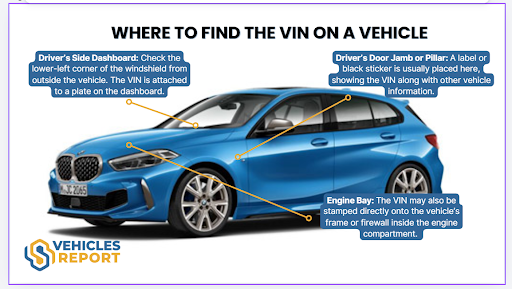
On a Jaguar, the VIN is placed in a few spots on the vehicle’s body and the paperwork. Check these locations for the VIN.
On the Vehicle’s
Check these spots for the VIN in a Jaguar.
- Dashboard / Windshield Area: Located at the lower left corner of the dashboard, visible through the windshield from outside the vehicle.
- Driver’s Door Jamb: Displayed on a certification label attached to the door pillar when the driver’s door is open.
- Engine Bay: Stamped on the chassis or inner fender area, commonly positioned near the suspension tower.
On the Vehicle’s Paperworks
- Vehicle Registration: the state-issued card consistently lists the VIN.
- Vehicle Title: the legal instrument of ownership displays the VIN.
- Insurance Card: your proof of coverage includes the VIN for policy identification.
- Service & Maintenance Records: dealership invoices always contain the VIN.
How to Decode a Jaguar VIN?
To decode the Jaguar VIN with our service, you can use our service and get the result in less than a minute. Follow these simple steps.
Find the VIN
Check on the driver’s side doorjamb or on the vehicle’s documentation. If you can’t find the VIN, ask the seller.
Fill in the Form
Click on the form above, then write down the VIN on the form.
See the Jaguar Specifications
Check on the preview page to see the car’s detailed specifications. Then, proceed to payment to get the full vehicle history report.
Why Decode a Jaguar VIN?
Before committing to a used Jaguar, every detail matters. From performance tuning to luxury specifications, confirming the exact factory build helps ensure the vehicle meets expectations. Buyers, sellers, insurers, and technicians can all rely on a Jaguar VIN decoder to access verified vehicle data.
For Buyers
Decoding a Jaguar VIN helps reduce uncertainty and confirms the car aligns with the seller’s listing.
Confirm Factory Specifications
A VIN decoder identifies the exact Jaguar model, whether it is an F-PACE, XE, XF, or F-TYPE, along with engine variants such as Ingenium petrol or diesel, mild hybrid systems, transmission type, and RWD or AWD configurations.
Verify the Engine
Confirm whether the Infiniti has an F-Type, actually the 575-horsepower R or the 340-horsepower V6? The 8th character of the VIN reveals the exact engine.
How to Read a Jaguar VIN Number?
Reading a Jaguar VIN manually can be confusing without understanding how each character is assigned. To make it easier, check the section below to know how to read a Jaguar VIN.
WMI (WMI (World Manufacturer Identifier))
1-3 characters: SAJ
- S = Country of origin: United Kingdom
- A = Manufacturer: Jaguar Land Rover
- J = Jaguar
VDS (VDS (Vehicle Descriptor Section))
4–9 characters: AK4BV0
- A = Model line: Jaguar XE
- K = Body style: Sedan
- 4 = Series or trim designation
- B = Engine type (2.0L 4-cylinder)
- V = Restraint or safety system configuration
- 0 = Check digit used to validate the VIN
VIS (VIS (Vehicle Identifier Section))
10–17 characters: HA966323
- H = Model year: 2017
- A = Assembly plant
- 966323 = Sequential production number unique to the vehicle
How to Decode a Classic Jaguar VIN?
Jaguar traces its roots to the Swallow Sidecar Company, founded on September 4, 1922, long before the standardized 17-character VIN system became mandatory for the 1981 model year. Many classic Jaguars use shorter VINs or chassis numbers that require a different decoding approach than modern vehicles.
Our Classic Jaguar VIN Decoder supports many Jaguar VINs and chassis numbers ranging from 5 to 14 characters, making it easier to identify historic vehicles that cannot be decoded using standard VIN lookup tools.
Need More Than Jaguar Factory Specs?
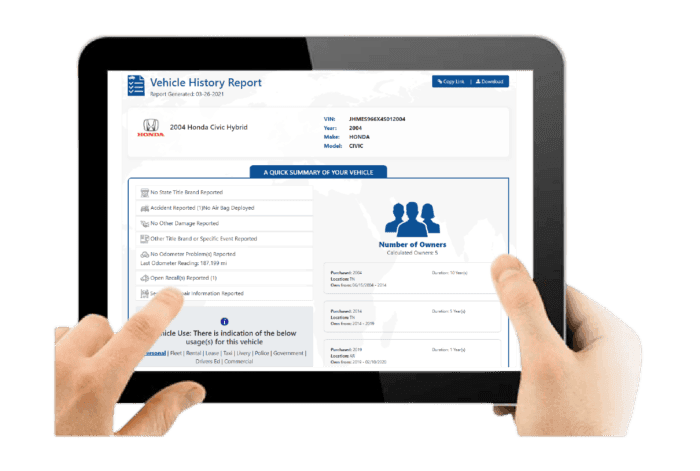
After decoding the VIN and reviewing the preview page, you will receive the complete vehicle history report for your Jaguar. Below is what the full report includes.
Vehicle Specifications
This section outlines the original factory build of the Jaguar. Confirm the engine configuration, trim level, drivetrain setup, and performance features..
Core Vehicle Configuration
Includes engine options such as turbocharged four-cylinder Ingenium engines, V6, or V8 powertrains, transmission type, drivetrain layout like RWD or AWD, and trims such as XF, XE, or F-PACE.
Production and Pricing Details
Displays the model year, assembly location, and original MSRP to help verify factory-installed options, performance packages, luxury interior features, and advanced driver-assistance technologies.
Core Vehicle Configuration
Includes engine options such as turbocharged four-cylinder Ingenium engines, V6, or V8 powertrains, transmission type, drivetrain layout like RWD or AWD, and trims such as XF, XE, or F-PACE.
Production and Pricing Details
Displays the model year, assembly location, and original MSRP to help verify factory-installed options, performance packages, luxury interior features, and advanced driver-assistance technologies.
Damage Records
Damage records show previously reported incidents that may affect body integrity, suspension performance, or overall vehicle reliability.
Collision and Structural Damage
Identifies accident-related damage that may affect chassis alignment, aluminum body panels, or structural safety components.
Fire and Environmental Damage
Shows flood, fire, hail, or other severe environmental damage officially recorded under the VIN.
Collision and Structural Damage
Identifies accident-related damage that may affect chassis alignment, aluminum body panels, or structural safety components.
Fire and Environmental Damage
Shows flood, fire, hail, or other severe environmental damage officially recorded under the VIN.
Accident Records
Accident history provides documented collision events that may influence safety performance, durability, and resale value.
Accident Dates and Locations
Lists when accidents occurred and where they were officially reported.
Structural and Safety Indicators
Highlights repair areas that could involve airbags, braking systems, stability control, or driver assistance technologies.
Accident Dates and Locations
Lists when accidents occurred and where they were officially reported.
Structural and Safety Indicators
Highlights repair areas that could involve airbags, braking systems, stability control, or driver assistance technologies.
Stolen Records
This check confirms whether the Jaguar has ever been reported stolen, helping reduce legal and financial risks before purchase.
Theft Status Verification
Confirms past or current stolen vehicle reports associated with the VIN.
Theft Record Details
Provides reported theft dates and locations for verification.
Theft Status Verification
Confirms past or current stolen vehicle reports associated with the VIN.
Theft Record Details
Provides reported theft dates and locations for verification.
Auction History
Auction history shows whether the Jaguar was previously sold through wholesale channels due to trade-ins, lease returns, repossession, or prior damage.
Auction Sale Records
Displays auction dates, locations, and recorded sale prices.
Condition Reports and Photos
May include condition summaries and archived auction photos when available.
Auction Sale Records
Displays auction dates, locations, and recorded sale prices.
Condition Reports and Photos
May include condition summaries and archived auction photos when available.
Sales History
Sales records track listing activity over time, helping identify repeated resale attempts or unusual pricing trends.
Listing and Sale Timeline
Shows when the Jaguar was listed, sold, or relisted.
Resale Activity Patterns
Highlights short ownership cycles that may indicate unresolved mechanical or performance concerns.
Listing and Sale Timeline
Shows when the Jaguar was listed, sold, or relisted.
Resale Activity Patterns
Highlights short ownership cycles that may indicate unresolved mechanical or performance concerns.
Service & Maintenance Records
Service history shows how consistently the Jaguar was maintained, which is essential for engine performance and long-term dependability.
Routine Service Documentation
Includes oil changes, scheduled maintenance visits, and recorded service dates.
Repair and Maintenance History
Shows documented repairs and replacement of major components such as engines, transmissions, suspension components, or electronic systems.
Routine Service Documentation
Includes oil changes, scheduled maintenance visits, and recorded service dates.
Repair and Maintenance History
Shows documented repairs and replacement of major components such as engines, transmissions, suspension components, or electronic systems.
Title Check
The title check verifies the Jaguar’s legal status and identifies branding that may affect resale value or registration.
Title Status Confirmation
Indicates whether the title is clean or carries a branded designation.
Branded Title Details
Flags salvage, rebuilt, flood-damaged, or lemon status in official records.
Title Status Confirmation
Indicates whether the title is clean or carries a branded designation.
Branded Title Details
Flags salvage, rebuilt, flood-damaged, or lemon status in official records.
Mileage History
Mileage records provide historical odometer readings to confirm usage patterns and detect possible discrepancies.
Recorded Odometer Entries
Displays mileage readings along with corresponding reporting dates.
Rollback Detection Indicators
Helps identify irregular mileage patterns or suspected odometer tampering.
Recorded Odometer Entries
Displays mileage readings along with corresponding reporting dates.
Rollback Detection Indicators
Helps identify irregular mileage patterns or suspected odometer tampering.
Lien or Loan Check
This section identifies outstanding financial obligations that could affect ownership transfer.
Active Lien Status
Confirms whether a lender currently holds a legal claim on the vehicle.
Outstanding Loan Details
Shows unpaid balances that must be settled before completing the transaction.
Active Lien Status
Confirms whether a lender currently holds a legal claim on the vehicle.
Outstanding Loan Details
Shows unpaid balances that must be settled before completing the transaction.
Ownership Records
Ownership history outlines how many individuals previously owned the Jaguar and how frequently it changed hands.
Number of Previous Owners
Indicates the total number of recorded owners associated with the VIN.
Ownership Duration and Region
Shows ownership length and registration regions while protecting personal information.
Number of Previous Owners
Indicates the total number of recorded owners associated with the VIN.
Ownership Duration and Region
Shows ownership length and registration regions while protecting personal information.
Recall Information
Recall information confirms whether Jaguar has issued safety-related recalls and whether corrective actions were completed.
Recall Notice Details
Lists recall dates, affected components, and reasons for issuance.
Repair Completion Status
Confirms whether recall-related repairs were performed and properly documented.
Recall Notice Details
Lists recall dates, affected components, and reasons for issuance.
Repair Completion Status
Confirms whether recall-related repairs were performed and properly documented.
Why Use Our Jaguar VIN Decoder
Our Jaguar VIN decoder helps you check the car’s specifications and other conditions like auction, warranty, and more.
Swift Process
We can deliver the full specifications information and complete vehicle history report in less than a minute.
24/7 Live Chat
Use the live chat feature, and our customer service will assist you promptly.
No Expiration Date
Our Jaguar VIN decoder has no expiration date. That is why you can access the report as much as you can.
Trusted & Updated Data Sources
Our data combines DMV databases, insurance providers, Copart, IAAI, and other trusted data!
Free Jaguar VIN Decoder
Our basic Jaguar VIN Decoder is completely free to use.
Jaguar-Specific Decoding
We decode supercharged V8 and V6 variants, SVR performance packages, British assembly plants, and classic models.
Check Any Jaguar's Specs and Records
Search these Jaguar’s VIN to get the specifications and report.
Check Other Services
Use our other vehicle check services to get the best deals.
Jaguar Window Sticker Lookup
Verify the vehicle’s original details, including standard features, optional packages, and more.
License Plate Lookup
If the VIN isn't immediately available, a License Plate Lookup can help you begin researching a vehicle before obtaining additional records.
Jaguar Recall Check
Checking for open recalls helps you determine whether your Jaguar requires repairs that may affect its safety, reliability, or performance.
Decode the Jaguar VIN Now
Before signing any documentation or transferring funds, verify the DNA of that Jaguar. Enter the VIN below to receive complimentary factory specifications instantly.
FAQs About Jaguar VIN Decoder
How do I tell what year my Jaguar is?
The easiest way is to decode the VIN. For most modern Jaguars, the 10th character identifies the model year, while our Jaguar VIN Decoder also confirms the vehicle generation, trim, and factory specifications.
Can you tell a vehicle year by VIN?
Yes. Modern 17-character VINs include a model year code in the 10th character. Our Jaguar VIN Decoder automatically identifies the correct model year without requiring manual VIN interpretation.
How do you identify a Jaguar?
A Jaguar can be identified by its VIN. Decoding the VIN reveals the original model, model year, trim, engine, transmission, drivetrain, manufacturing information, and other factory details.
How do I manually decode a VIN number?
You can manually decode a VIN by interpreting each of its 17 characters using manufacturer-specific references. However, our Jaguar VIN Decoder automatically translates the VIN into easy-to-read factory specifications in seconds.
Can I look up my vehicle specs with VIN?
Detailed vehicle specifications can be retrieved using the 17-character VIN through online decoding tools. A VIN lookup provides information such as the model year, make, model, engine size, trim level, transmission type, drivetrain configuration, and factory-installed features within seconds.
What is the build date of a car by VIN number?
A car’s build date is partially identified through its 17-character VIN. The 10th character indicates the model year, while other characters relate to production details. For the exact production month, check the sticker on the driver-side door jamb or use a specialised VIN decoding service.
How can I check the manufacture date?
To determine a product’s manufacture date, inspect the label, packaging, or device casing for a printed or stamped code. Dates may appear in formats such as YYMMDD or MM/YY, or be embedded within the serial number. You can also verify the date through the manufacturer’s website or device settings, depending on the product type.
How to decode a 13 digit VIN number?
Many older Jaguar vehicles use VINs or chassis numbers shorter than today's 17-character format. Our Classic Jaguar VIN Decoder supports Jaguar VIN numbers ranging from 5 to 14 digits, depending on the production year.