
Check the Tesla Details With a VIN Decoder
Buying a used Tesla can be challenging because similar models may have different battery configurations, drivetrains, and factory equipment. Decoding the VIN helps verify Tesla's factory specifications, including the trim, battery configuration, drivetrain, MSRP, and estimated market value, all at no cost!
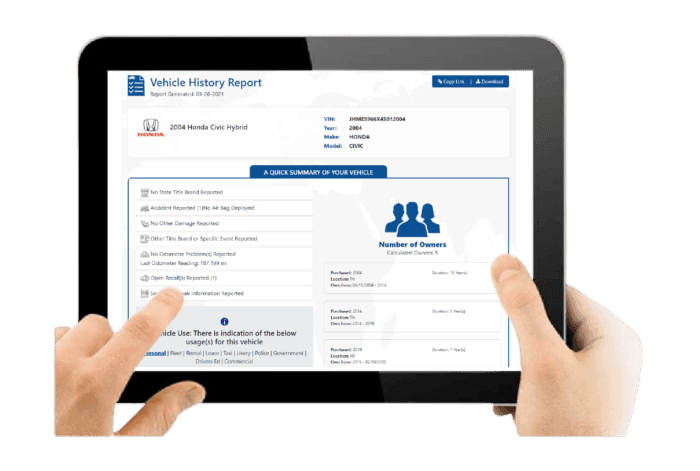
What is a Tesla VIN?
A Tesla VIN or Vehicle Identification Number is a 17-digit number assigned to every vehicle as an identifier. The VIN conveys important information about your vehicle, like the location of the manufacturer’s plant, engine type, and its serial number. Even though two Teslas have the same year, model, and trim, their VINs are surely different.
What Can a Tesla VIN Decoder Show?
Our free Tesla VIN decoder reveals factory specifications that help you understand exactly how the vehicle was built.
Vehicle Origin
Knowing the factory origin of a Tesla is important because it reveals critical differences in build quality, parts compatibility, and tax or tariff qualifications.
Vehicle Year
Identify the official Tesla model year to confirm the vehicle's age and production period.
Model
Verify whether the VIN belongs to a Tesla Model S, Tesla Model 3, Tesla Model X, Tesla Model Y, Tesla Cybertruck, or a Tesla Roadster.
Trim Level
Confirm the factory trim, including variants such as Long Range, Performance, Plaid, Plaid+, and more by decoding Tesla VIN numbers.
Battery Configuration
Tesla battery technology changes frequently throughout production. VIN decoding helps identify the original battery configuration and drivetrain layout available from the factory.
Motor & Drivetrain
Determine whether the vehicle was built with a Rear-Wheel Drive (RWD), Dual Motor All-Wheel Drive (AWD), Tri-Motor AWD (Plaid), or a Quad Motor (Cybertruck, where applicable).
Transmission
Tesla vehicles use a single-speed automatic transmission, providing smooth power delivery without traditional gear changes.
Original MSRP
View the manufacturer's suggested retail price when available to better understand depreciation and compare asking prices.
Estimated Market Value
Get an estimated market value based on the vehicle's factory configuration to help with buying, selling, financing, or trade-in decisions.
Where to Find the VIN on a Tesla Vehicle
.png)
On a Tesla, the VIN can be found in several places in the vehicle documentation.
On the Vehicle
Inspect the following areas carefully:
- In-Car Touchscreen (Fastest Method): On the centre display, tap Controls, then select Software to view the vehicle information.
- Windshield Base: Check the lower corner of the driver’s side windshield from outside the vehicle. The number is typically visible at the base of the glass.
- Door Pillar: Open the driver’s door and inspect the label located on the B-pillar. The vehicle information is printed on this sticker.
Outside the Vehicle
If the vehicle isn't nearby, your Tesla VIN is also available on several documents and digital resources. Check the following:
- Tesla Mobile App: Access Vehicle Information to see the VIN linked to your Tesla.
- Insurance Documents: Your insurer prints the VIN on your insurance card or policy.
- Vehicle Registration: Look for the VIN on your registration certificate.
- Bill of Sale: Review the purchase paperwork for the complete VIN.
How to Decode a Tesla VIN?
To look up a Tesla VIN, use our Tesla VIN decoder to get the vehicle identity in less than a minute.
Find the VIN
Once you have the VIN, click on the form above and enter the VIN. After that, click on the button to submit the form.
Fill in the Form
Once you have the VIN, write it down on the form above. Then, click on the button to submit the form.
Upgrade to Full History Reports
Within seconds to get the report generated. After that, check the preview page. Then, proceed to payment to get the full vehicle history report.
Why Decoding the Tesla VIN is Important
A VIN is essential because it serves as the official identity of a vehicle. A VIN can be used to ensure transparency before any transaction happens, to find the right OEM parts, and to check the car’s background before ownership changes.
Buyers
Using our Tesla VIN decoder helps confirm the exact model, battery pack, motor setup, and production year before purchase.
Verify EV Specifications
Check Standard Range, Long Range, or Performance variants, plus RWD or Dual Motor configuration.
Review Vehicle Background
Confirm accident records, title status, mileage data, ownership history, and reported damage.
How to Read a Tesla VIN?
The VIN consists of 17 characters and is divided into three main sections: WMI, VDS, and VIS. Each character provides specific details about the vehicle’s origin, configuration, and production sequence.
WMI (WMI (World Manufacturer Identifier))
1-3 characters: 5YJ
- 5 = Country of origin: United States
- YJ = Manufacturer: Tesla, Inc.
5YJ designates a Tesla vehicle manufactured in the United States.
VDS (VDS (Vehicle Descriptor Section))
4–9 characters: SA1E56
- S = Model line: Model S
- A = Body type: 5-door liftback
- 1 = Restraint system: Active safety and airbag configuration
- E = Motor/drive unit type (electric powertrain variant)
- 5 = Battery/motor configuration (manufacturer-specific)
- 6 = Check digit used to validate the VIN
VIS (VIS (Vehicle Identifier Section))
10–17 characters: NF488525
- N = Model year: 2022
- F = Assembly plant: Fremont, California
- 488525 = Unique sequential production number
Need More Than Tesla VIN Specs?
Our Tesla vehicle history report provides detailed information that goes beyond basic specifications. Because Tesla vehicles are fully electric and software-driven, checking the VIN helps you understand both the hardware configuration and the vehicle’s background before buying or selling.
Vehicle Specifications
This section outlines Tesla’s original factory configuration, including battery setup, motor type, and production details that influence range and performance.
Battery and Motor Configuration
Includes battery type, RWD or Dual Motor setup, and trim level variations.
Production and Pricing Details
Displays production year, manufacturing plant, and original MSRP to verify factory specifications.
Battery and Motor Configuration
Includes battery type, RWD or Dual Motor setup, and trim level variations.
Production and Pricing Details
Displays production year, manufacturing plant, and original MSRP to verify factory specifications.
Damage Records
Damage records reveal previously reported incidents that may affect battery systems, structural integrity, or overall vehicle safety.
Structural and Collision Damage
Identifies frame damage and impact-related repairs recorded through official or insurance sources.
Fire and Environmental Damage
Shows fire, flood, or other non-collision incidents linked to the VIN.
Structural and Collision Damage
Identifies frame damage and impact-related repairs recorded through official or insurance sources.
Fire and Environmental Damage
Shows fire, flood, or other non-collision incidents linked to the VIN.
Accident Records
Accident history provides documented collision events that may influence structural safety and long-term battery performance.
Accident Dates and Locations
Lists when accidents occurred and where they were officially reported.
Structural and Battery Impact Indicators
Highlights potential repairs that could affect chassis alignment or battery placement.
Accident Dates and Locations
Lists when accidents occurred and where they were officially reported.
Structural and Battery Impact Indicators
Highlights potential repairs that could affect chassis alignment or battery placement.
Stolen Vehicle Records
This check confirms whether the Tesla has ever been reported stolen, reducing legal and ownership risks.
Theft Status Verification
Confirms past or current stolen vehicle reports associated with the VIN.
Theft Record Details
Provides theft dates and reported locations for verification.
Theft Status Verification
Confirms past or current stolen vehicle reports associated with the VIN.
Theft Record Details
Provides theft dates and reported locations for verification.
Auction History
Auction history shows whether the Tesla was previously sold through insurance, repossession, or damage-related auctions.
Auction Sale Records
Displays auction dates, sale prices, and transaction history.
Condition Reports and Photos
May include listed vehicle condition and archived auction images when available.
Auction Sale Records
Displays auction dates, sale prices, and transaction history.
Condition Reports and Photos
May include listed vehicle condition and archived auction images when available.
Sales History
Sales records track listing activity over time, helping identify frequent resale patterns or unresolved concerns.
Listing and Sale Timeline
Shows when the Tesla was listed, sold, or relisted.
Resale Activity Patterns
Highlights short-term ownership cycles that may indicate mechanical or software issues.
Listing and Sale Timeline
Shows when the Tesla was listed, sold, or relisted.
Resale Activity Patterns
Highlights short-term ownership cycles that may indicate mechanical or software issues.
Service & Maintenance Records
Although Tesla vehicles require less routine servicing, documented repairs and component replacements remain important for long-term evaluation.
Service Visit Documentation
Includes recorded service dates and repair appointments.
Component Replacement History
Shows documented battery, motor, or software-related repairs.
Service Visit Documentation
Includes recorded service dates and repair appointments.
Component Replacement History
Shows documented battery, motor, or software-related repairs.
Title Check
The title check verifies Tesla’s legal standing and identifies branding that may affect value or registration.
Title Status Confirmation
Indicates whether the title is clean or branded.
Branded Title Details
Flags salvage, rebuilt, or lemon designations in official records.
Title Status Confirmation
Indicates whether the title is clean or branded.
Branded Title Details
Flags salvage, rebuilt, or lemon designations in official records.
Mileage History
Mileage records provide historical odometer readings to confirm usage patterns and detect possible inconsistencies.
Recorded Odometer Entries
Displays mileage readings with corresponding reporting dates.
Tampering Detection Indicators
Helps identify irregular mileage patterns despite digital monitoring systems.
Recorded Odometer Entries
Displays mileage readings with corresponding reporting dates.
Tampering Detection Indicators
Helps identify irregular mileage patterns despite digital monitoring systems.
Lien or Loan Check
This section identifies outstanding financial obligations that could legally affect ownership transfer.
Active Lien Status
Confirms whether a lender holds a legal claim on the vehicle.
Outstanding Loan Details
Shows unpaid balances that must be cleared before completing the transaction.
Active Lien Status
Confirms whether a lender holds a legal claim on the vehicle.
Outstanding Loan Details
Shows unpaid balances that must be cleared before completing the transaction.
Ownership Records
Ownership history outlines how many individuals previously owned the Tesla and how frequently it changed hands.
Number of Previous Owners
Indicates total recorded owners linked to the VIN.
Ownership Duration and Region
Shows ownership length and registration regions while protecting personal data.
Number of Previous Owners
Indicates total recorded owners linked to the VIN.
Ownership Duration and Region
Shows ownership length and registration regions while protecting personal data.
Recall Information
Recall information confirms whether Tesla, Inc. has issued safety-related recalls and whether corrective actions were completed.
Recall Notice Details
Lists recall dates, affected systems, and reasons for issuance.
Repair Completion Status
Confirms whether recall-related corrective measures were performed and resolved.
Recall Notice Details
Lists recall dates, affected systems, and reasons for issuance.
Repair Completion Status
Confirms whether recall-related corrective measures were performed and resolved.
Why Users Trust Our Tesla VIN Decoder
Our Tesla VIN decoder is designed to help buyers, sellers, and owners verify factory vehicle specifications before making important decisions. Vehicle data is sourced from trusted automotive databases, while optional history reports provide additional ownership and title records.
Efficient and User-Friendly Service
The process is designed to be clear, smooth, and easy to complete.
Dedicated 24/7 Customer Care
Reach out whenever you need clarification or help with your order, and you’ll receive a response in less than five minutes.
No Time Restrictions
Once your report is generated, it remains available without expiration. Access, save, or print it whenever it suits you.
Worldwide VIN Coverage
Supports all Tesla vehicles sold in major global markets.
Trusted and Updated Data Source
Vehicle specifications are sourced from reliable automotive databases.
Decode Any Tesla VIN
Choose a Tesla model to view its vehicle information.
- Model S
- Model 3
- Model S Plaid
- Model 3 Performance
- Model X
- Model Y
- Model X Plaid
- Model Y Performance
- Roadster
- Cybertruck
- Semi
- Roadster 2023
Check Other Services
You can use our other services to get more information about the vehicle.
Tesla Window Stickers
Find out exactly how the vehicle left the factory, from features to installed packages.
License Plate Lookup
VIN not on hand? Use the plate number to access vehicle history information quickly.
Tesla recall check
Type in the VIN and review the car’s history to ensure it doesn’t have an unresolved safety campaign.
Decode Your Tesla VIN Now
Enter your Tesla VIN to instantly view free factory specifications, including trim, drivetrain, battery configuration, MSRP, and estimated market value. If you need deeper ownership or title records, you can upgrade to a complete vehicle history report at any time.
Frequently Asked Questions About Tesla VIN Decoder
Can I decode a Tesla VIN for free?
Yes. You can use our free Tesla VIN decoder to view factory specifications, including the model year, model, trim, drivetrain, battery configuration, original MSRP, and estimated market value. If you need accident history, title records, mileage, or ownership information, you can upgrade to a full vehicle history report.
What does a Tesla VIN number start with?
Tesla VINs often begin with 5YJ for US-built Model S and Model 3 vehicles. Newer Model Y and Model X units may start with 7SA for Fremont production or XP7 for Berlin production. Vehicles manufactured in China typically start with LRW. These first three characters form the World Manufacturer Identifier, which identifies the manufacturer and production location.
What does the 1st digit in a VIN number mean?
The first character of a Vehicle Identification Number indicates the country of manufacture or final assembly. For example, 1, 4, or 5 represent the United States, 2 stands for Canada, 3 indicates Mexico, and J represents Japan. This digit helps confirm where the vehicle was built.
How to tell if Tesla is MCU1 or MCU2?
To find out whether your Tesla is equipped with MCU1 or MCU2, go to Controls, then Software, and select Additional Vehicle Information. Check the infotainment processor listed. NVIDIA Tegra means MCU1, while Intel Atom means MCU2. Vehicles with MCU2 also support Theater apps such as Netflix and YouTube, along with a faster browser and improved connectivity.
What is SC01 for Tesla?
SC01 is Tesla’s internal code for lifetime, fully transferable Free Unlimited Supercharging. It is commonly found on pre-2017 Model S and Model X vehicles. Unlike newer incentives such as SC04 or SC05, which are tied to the original owner, SC01 remains attached to the vehicle’s VIN and transfers to the next owner in a private sale.
Can I check the original price of a Tesla by VIN?
Yes. Our Tesla VIN decoder can display the original manufacturer's suggested retail price (MSRP) for Tesla, helping buyers compare the vehicle's original value with its current market price.
How to check if my Tesla has Free Supercharging (SC01) by VIN?
Tesla's SC01 code is attached to the VIN for pre-2017 Model S and Model X vehicles. While the VIN itself doesn't explicitly show SC01, you can decode the VIN to confirm the model year and production period. Pre-2017 vehicles are more likely to have SC01. Always verify with Tesla directly or use a Tesla-specific VIN tool.
How to tell if my Tesla has HW3 or HW4 Autopilot by VIN?
The VIN can help identify the approximate production period, which correlates with hardware versions. However, for exact hardware confirmation, check the vehicle's software settings or contact Tesla support with the VIN.