
Check Saturn's Transmission & Specs Using VIN Decoder
Enter your Saturn’s VIN in the form below to uncover key factory details, including the original transmission type, engine configuration, trim level, and drivetrain setup. Decode your Saturn VIN number now!
What is a Saturn VIN?
A Saturn VIN is a 17-character identification code assigned to each vehicle at the time of manufacture. No two Saturn vehicles share the same VIN, even if they are the same model and year. You can utilize the VIN to look up the Saturn’s specifications.
Models such as the S-Series, Ion, Vue, Aura, Outlook, and Sky were produced with different engine options, gearboxes, and trim packages.
The VIN confirms original factory specifications, including engine size, such as a 1.9L four-cylinder or 3.6L V6, manual or automatic transmission, front-wheel or all-wheel drive configuration, model year, assembly plant, and unique production number.
What Information Can You See with a Saturn VIN?
Using our free Saturn VIN Decoder, you can verify available factory information about your vehicle.
Model Year
Confirm the Saturn's production year to identify the correct model generation before purchasing, servicing, registering, or restoring the vehicle.
Trim Level
Verify the original trim or configuration when available. Saturn offered different equipment levels across its model lineup and production years.
Engine
Identify the original factory-installed engine when available. Engine information helps verify the vehicle's original configuration and can support parts research and maintenance planning.
Transmission
Verify the original factory transmission, including available manual and automatic configurations depending on the Saturn model and production year.
Drivetrain
Confirm the original drivetrain configuration, including Front-Wheel Drive (FWD) and All-Wheel Drive (AWD) where applicable.
Factory Equipment
Review available original equipment and specifications, which can include safety equipment, wheels, seating, audio systems, sunroofs, and other factory-installed features.
Manufacturing Information
Identify available production information associated with the Saturn, including the manufacturing location when available.
Original MSRP
Review the manufacturer's original suggested retail price when pricing information is available.
Estimated Market Value
Compare the Saturn's decoded specifications with available market information to understand its current value.
Where to Find the VIN on a Saturn?
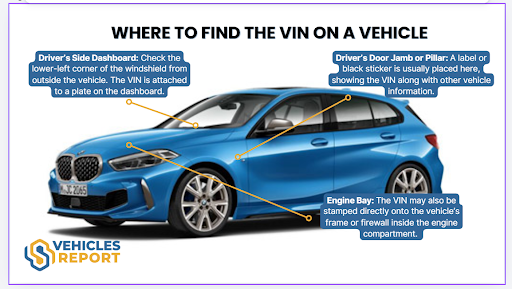
The VIN is printed on multiple parts of the vehicle and listed on official paperwork. Always make sure the VIN matches everywhere it appears.
On the Vehicle
You can usually find the VIN in these locations:
- Dashboard: Lower-left corner of the windshield on the driver’s side, visible from outside.
- Driver’s Side Door Frame: Displayed on a certification sticker inside the door jamb.
- Engine Bay: Stamped onto a fixed structural area such as the firewall or radiator support.
When the Vehicle Is Inaccessible?
If you do not have your Saturn vehicle with you, you can find the VIN in some places below:
- Vehicle registration: Look for the paper registration card that you keep at home or in your personal files.
- Vehicle title: Find the state-issued title certificate for your car.
- Loan statements: Check your auto loan or financing account online, or look at past statements.
- Repair bills: Identify your VIN on previous oil change receipts, mechanic invoices, or body shop estimates.
- Purchase paperwork: Go through the original bill of sale or dealer contract from when you purchased the car.
How to Decode a Saturn VIN?
You can use our Saturn VIN decoder tool to decode the VIN and check its full specifications report. Follow these simple steps to get it done.
Find the VIN
Examine the car’s driver’s side doorjamb or the paperwork. If you can’t find it, you can ask the seller instead.
Fill Out the Form
Click on the form above to write down the VIN. Then, click on the button to submit the form.
Get the Report
Examine the preview page to see the specifications. If you need more information, click on the form to get more information.
Who Needs to Decode the Saturn VIN?
Whether buying, selling, insuring, or servicing a Saturn, decoding the VIN provides verified factory specifications and ownership history. A detailed vehicle history report helps private owners, used car buyers, dealers, and mechanics make informed decisions.
Buyers
Decoding a Saturn VIN number reduces uncertainty and confirms the vehicle matches its advertised configuration and original factory build.
Confirm Factory Specifications
Verifies the exact model, such as Ion, Vue, Aura, Outlook, or Sky, including engine type, transmission, trim level, and drivetrain configuration.
Avoid Unexpected Issues
Review service history, accident records, title status, mileage consistency, recall information, and possible lien records before completing the purchase.
How to Read the Saturn VIN Number?
The VIN on a Saturn vehicle consists of 17-digits of numbers and letters. Each VIN component represents different vehicle information. Here’s how you can read a vehicle’s VIN based on the classification: WMI, VDS, and VIS.
WMI (WMI (World Manufacturer Identifier))
1-3 characters: 1G8
- 1 = Country of origin: United States
- G = General Motors
- 8 = Saturn Corporation
VDS (VDS (Vehicle Descriptor Section))
4–9 characters: AJ55F2
This section identifies the model and configuration.
- AJ = Saturn Ion carline/series
- 55 = Manufacturer-defined vehicle attributes
- F = Engine type: 2.2L 4-cylinder (Ecotec)
- 2 = Check Digit
VIS (VIS (Vehicle Identifier Section))
10–17 characters: 7Z127618
- 7 = Model year: 2007
- Z = Assembly plant: Spring Hill, Tennessee
- 127618 = Sequential production number
Need More Than Saturn VIN Specs?
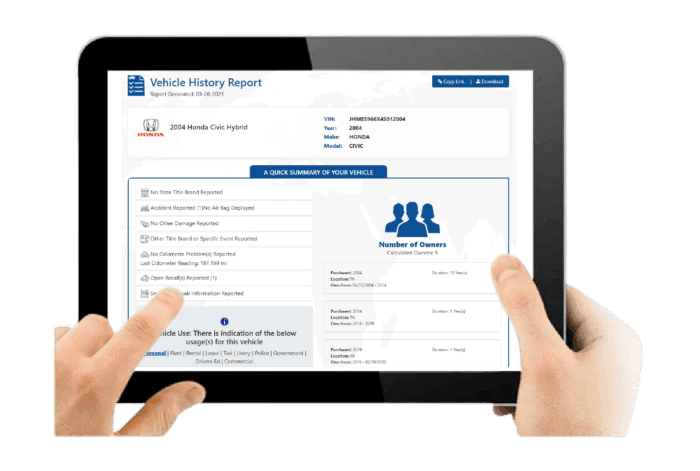
A Saturn history report highlights the vehicle’s original specifications, ownership background, and key records that may influence reliability, safety, and long-term ownership costs.
Vehicle Specifications
This section confirms how the Saturn was originally configured at the factory, including engine setup, trim designation, drivetrain layout, and practical equipment designed for everyday driving.
Core Vehicle Configuration
Includes engine options such as inline four-cylinder EcoTec engines or V6 powertrains, automatic or manual transmission, FWD drivetrain layout, and models like Ion, Aura, Vue, Outlook, or Sky roadster.
Production and Pricing Details
Displays model year, manufacturing details from GM production plants, and original MSRP to verify factory-installed packages, interior features, and technology equipment.
Core Vehicle Configuration
Includes engine options such as inline four cylinder EcoTec engines or V6 powertrains, automatic or manual transmission, FWD drivetrain layout, and models like Ion, Aura, Vue, Outlook, or Sky roadster.
Production and Pricing Details
Displays model year, manufacturing details from GM production plants, and original MSRP to verify factory installed packages, interior features, and technology equipment.
Damage Records
Damage records identify incidents that may affect structural integrity, mechanical components, or long-term reliability.
Collision and Structural Damage
Highlights accident-related repairs involving body panels, chassis alignment, or structural sections of the vehicle.
Fire and Environmental Damage
Shows flood, fire, hail, or severe weather damage recorded in official reporting databases associated with the VIN.
Collision and Structural Damage
Highlights accident related repairs involving body panels, chassis alignment, or structural sections of the vehicle.
Fire and Environmental Damage
Shows flood, fire, hail, or severe weather damage recorded in official reporting databases associated with the VIN.
Accident Records
Accident history provides documented collision reports that may influence safety performance and resale value.
Accident Dates and Locations
Lists when accidents occurred and where they were officially recorded in reporting systems.
Structural and Safety Indicators
Highlights repairs affecting airbags, braking systems, traction control, or other safety-related components.
Accident Dates and Locations
Lists when accidents occurred and where they were officially recorded in reporting systems.
Structural and Safety Indicators
Highlights repairs affecting airbags, braking systems, traction control, or other safety related components.
Stolen Records
This check confirms whether the Saturn has ever been reported stolen in official vehicle databases.
Theft Status Verification
Confirms whether the VIN appears in national or international stolen vehicle reporting systems.
Theft Record Details
Provides theft report dates, locations, and recovery status when available.
Theft Status Verification
Confirms whether the VIN appears in national or international stolen vehicle reporting systems.
Theft Record Details
Provides theft report dates, locations, and recovery status when available.
Auction History
Auction history shows whether the Saturn appeared in dealer auctions, trade-in channels, or wholesale resale markets.
Auction Sale Records
Displays auction dates, locations, and recorded sale prices from previous auction transactions.
Condition Reports and Photos
May include archived auction photos and vehicle condition summaries when available.
Auction Sale Records
Displays auction dates, locations, and recorded sale prices from previous auction transactions.
Condition Reports and Photos
May include archived auction photos and vehicle condition summaries when available.
Sales History
Sales records track listing activity across dealerships and used vehicle marketplaces.
Listing and Sale Timeline
Shows when the Saturn was listed, sold, or relisted across vehicle marketplaces.
Resale Activity Patterns
Highlights repeated resale cycles that may indicate mechanical concerns or short ownership periods.
Listing and Sale Timeline
Shows when the Saturn was listed, sold, or relisted across vehicle marketplaces.
Resale Activity Patterns
Highlights repeated resale cycles that may indicate mechanical concerns or short ownership periods.
Service & Maintenance Records
Service history helps determine whether the Saturn received consistent maintenance during its ownership.
Routine Service Documentation
Includes scheduled maintenance records such as oil changes, inspections, and routine service visits.
Repair and Maintenance History
Shows documented repairs involving engines, transmissions, suspension components, or braking systems.
Routine Service Documentation
Includes scheduled maintenance records such as oil changes, inspections, and routine service visits.
Repair and Maintenance History
Shows documented repairs involving engines, transmissions, suspension components, or braking systems.
Title Check
The title check confirms the vehicle’s legal status and identifies branding that may affect resale or registration.
Title Status Confirmation
Indicates whether the title is clean or carries a branded designation.
Branded Title Details
Flags salvage, rebuilt, flood-damaged, or lemon branding recorded in official title databases.
Title Status Confirmation
Indicates whether the title is clean or carries a branded designation.
Branded Title Details
Flags salvage, rebuilt, flood damaged, or lemon branding recorded in official title databases.
Mileage History
Mileage records help verify vehicle usage and detect irregular odometer patterns.
Recorded Odometer Entries
Displays historical mileage readings together with corresponding reporting dates.
Rollback Detection Indicators
Helps identify irregular mileage patterns or suspected odometer rollback events.
Recorded Odometer Entries
Displays historical mileage readings together with corresponding reporting dates.
Rollback Detection Indicators
Helps identify irregular mileage patterns or suspected odometer rollback events.
Lien or Loan Check
This section identifies financial claims that may affect ownership transfer.
Active Lien Status
Confirms whether a lender currently holds a legal financial interest in the vehicle.
Outstanding Loan Details
Shows unpaid balances that must be settled before completing a sale.
Active Lien Status
Confirms whether a lender currently holds a legal financial interest in the vehicle.
Outstanding Loan Details
Shows unpaid balances that must be settled before completing a sale.
Ownership Records
Ownership history outlines how many individuals previously owned the Saturn.
Number of Previous Owners
Indicates the total number of recorded owners associated with the VIN.
Ownership Duration and Region
Shows ownership timelines and registration regions while protecting personal information.
Number of Previous Owners
Indicates the total number of recorded owners associated with the VIN.
Ownership Duration and Region
Shows ownership timelines and registration regions while protecting personal information.
Recall Information
Recall information confirms whether Saturn issued safety recalls for the vehicle.
Recall Notice Details
Lists recall dates, affected components, and reasons for manufacturer-issued safety notices.
Repair Completion Status
Confirms whether recall-related repairs were completed and properly documented.
Recall Notice Details
Lists recall dates, affected components, and reasons for manufacturer issued safety notices.
Repair Completion Status
Confirms whether recall related repairs were completed and properly documented.
Why Choose Our Saturn VIN Decoder?
Our Saturn VIN decoder helps uncover critical information about Saturn vehicles. Checking the VIN early reduces the risk of costly repairs after purchase.
Fast Results
There are no complicated steps or long delays. Enter the Saturn VIN, complete the form, and the full vehicle history report is generated in about seconds.
Support Whenever You Need It
Our customer support team is available 24 hours a day, 7 days a week, to assist with any report-related concerns.
Auction Photos Included
If the Saturn was previously sold at auction, the report may include up to 10 genuine auction images.
Worldwide VIN Coverage
Decode supported Saturn VINs and access available factory specifications for cars and SUVs from the brand's production years.
Trusted & Updated Data Sources
Our data combines DMV databases, insurance providers, Copart, IAAI, and more!
No Expiry on Your Report
There are no expiration dates and no extra charges to view the same Saturn report again.
Verify the Saturn's Trim by VIN
Know the car’s trim before you decide to purchase a used Saturn. Lookup Saturn’s VIN now and get the full specifications information.
Check Other Services
Want to get more information about the Saturn vehicle? Use our other services to reveal hidden information about the vehicle.
Saturn Window Sticker Lookup
View available original MSRP, factory options, colors, and equipment from the Saturn's original window sticker.
Saturn Recall Check
Check available Saturn safety recalls and manufacturer campaigns using the VIN.
Saturn License Plate Lookup
Find available Saturn vehicle information using the license plate when the VIN isn't immediately available.
Decode the Saturn VIN Before Buying
Be sure to know the car’s ins and outs, especially when you are buying a used car like a Saturn. Look up Saturn’s VIN to see the complete specifications information and upgrade to get the complete vehicle history report.
FAQs About Saturn VIN Decoder
How do I tell what model Saturn I have?
To determine your Saturn model, such as SL, SL1, SL2, Ion, or Vue, locate the 17-character Vehicle Identification Number (VIN) on the driver’s side dashboard or inside the door jamb. The 8th character identifies the engine or model variant and can be interpreted using a reliable VIN decoder.
What are the different Saturn car models?
Saturn produced several vehicle lines, including the S-Series, L-Series, Ion, Vue, Relay, Aura, Outlook, Sky, and Astra. The VIN can help identify the specific model, model year, and available factory configuration when records are available.
Can a Saturn VIN identify the engine?
Yes. A Saturn VIN can be used with a VIN decoder to identify the vehicle's original engine and other factory specifications when those records are available. The exact character positions used for specific attributes vary by model and production year.
Can I decode a VIN number for free?
Yes. Our free Saturn VIN Decoder can provide available factory specifications, including the model, year, engine, transmission, drivetrain, and other vehicle information.
Why can't I decode my VIN?
A VIN may fail to decode because of an incorrectly entered character, an incomplete VIN, an unsupported format, or limited records for an older vehicle. Check the VIN carefully and try again.