
Check Scion Specs and Factory Details with the VIN Decoders
Enter the Scion VIN in the form to see important factory details, including the original engine type, transmission configuration, trim level, and drivetrain setup. Decode the Scion VIN number now to verify its specs and Scion estimated market value.
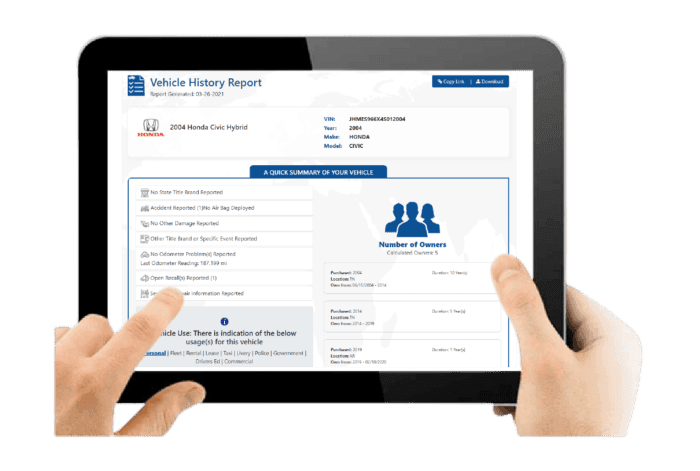
What is a Scion VIN?
A Scion VIN is a 17-character identification code assigned to every vehicle during manufacturing. Each VIN is unique, meaning no two Scion vehicles share the same identifier, even if they belong to the same model year and trim level.
This code helps verify the vehicle’s original specifications. Models such as the xB, xD, tC, FR-S, iA, and iM were produced with different engine options, transmissions, and equipment packages. The VIN confirms details such as engine size, transmission type, drivetrain configuration, model year, assembly plant, and the vehicle’s unique production number.
What Information Does a Scion VIN Show?
A decoded Scion VIN can provide available information about the vehicle's original specifications.
Model Year
Identify the Scion's model year and determine the correct generation and production period.
Engine
Identify the factory-installed engine associated with the VIN when the relevant information is available.
Transmission
Determine the original transmission configuration, including applicable manual or automatic options.
Drivetrain
Confirm the original drivetrain configuration. Most Scion passenger cars use front-wheel drive, while the FR-S uses rear-wheel drive.
Body Style
Identify the original body configuration, including hatchback, coupe, sedan, or other supported body styles.
Factory Equipment
Review available original equipment and options, which can include wheels, interior features, audio systems, safety equipment, performance equipment, and appearance packages.
Manufacturing Information
Review available production information associated with the Scion, including the manufacturing location.
Original MSRP
Review the original manufacturer's suggested retail price when pricing information is available.
Estimated Market Value
Review available market-value information to understand the vehicle's current market position.
Where to Find the VIN on a Scion?
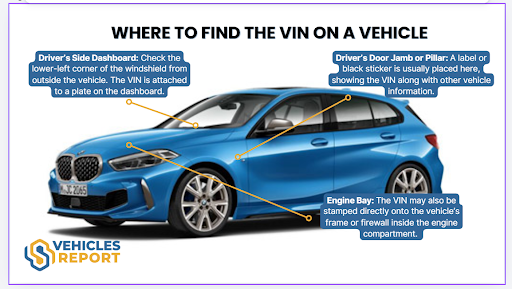
The VIN appears in several locations on the vehicle and on official documents. Always verify that the VIN matches across all listings.
On the Vehicle
The VIN is stamped or labeled in several visible areas of the vehicle for identification.
- Driver’s Side Dashboard: Look through the windshield on the lower left corner of the dashboard.
- Driver’s Side Door Jamb: Check the label or plate attached to the door frame or pillar.
- Engine Firewall: A stamped VIN or plate may appear on the metal firewall under the hood.
- Under the Front Seat: Some vehicles have a stamped VIN on the floorboard beneath the passenger seat.
On the Vehicle’s Paperworks
You can also find the VIN in the following documents:
- Vehicle title or registration card issued by your state department of motor vehicles.
- Auto insurance card or policy declaration statements.
- Loan or lease agreement paperwork from the bank or dealer.
- Service or repair records from a mechanic or dealership
How to Decode a Scion VIN?
Decoding a Scion VIN is easy; you just need to follow these simple steps to get it done in less than a minute.
Find the VIN
Check on the driver’s side doorjamb or on the paperwork like the bill of sale. If you can’t find it, ask the seller.
Fill Out the Form
Click on the form above and write down the VIN. Then, click on the button to submit the form.
Get the Report
Examine the preview page where you can check the Scion complete specifications. Need more information? Proceed to payment to get the full vehicle history report.
Who Needs to Lookup a Scion VIN?
Whether buying, selling, insuring, or servicing a Scion, decoding the VIN provides verified factory specifications and ownership history. Checking a Scion VIN helps confirm the vehicle’s configuration, equipment, and recorded background before making important decisions.
Buyers
Decoding a Scion VIN number helps verify the vehicle’s original build and ensures it matches the seller’s listing.
Verify the Engine
Is that FR‑S actually the 2.0L H4 (FA20) or a swapped engine? The VIN reveals the exact engine.
Confirm the Generation
The VIN reveals whether you are getting a first‑gen xB (boxy) or second‑gen xB (rounded).
How to Read a Scion VIN Number?
To read a VIN number, you must understand the VIN classification. The VIN is classified as WMI, VDS, and VIS. Check this section to see how to read a VIN.
WMI (WMI (World Manufacturer Identifier))
1-3 characters: JTL
- J = Country of origin: Japan
- T = Manufacturer: Toyota Motor Corporation
- L = Brand division: Scion
VDS (VDS (Vehicle Descriptor Section))
4–9 characters: ZE4FE2
Manufacturer-specific characters describing the vehicle configuration.
- Z = Model line: Scion
- E = Body style: 5-door hatchback
- 4 = Series/trim level
- F = Engine type: 1.8L inline-4 (Toyota 2ZR-FE)
- E = Safety/restraint system configuration
- 2 = Check digit
VIS (VIS (Vehicle Identifier Section))
10–17 characters: FJ068469
- F = Model year: 2015
- J = Assembly plant: Japan (Toyota production facility)
- 068469 = Sequential production number assigned during manufacturing
Need More Than Scion VIN Specs?
A Scion vehicle history report provides detailed insight into a vehicle’s background, specifications, and recorded events. This information helps buyers, sellers, and current owners better understand the car’s condition, usage history, and potential concerns before making decisions.
Vehicle Specifications
This section outlines the Scion’s original factory configuration, helping confirm its features, drivetrain setup, and build details.
Core Vehicle Configuration
Includes fuel type, drivetrain layout such as front-wheel drive (FWD) or rear-wheel drive (RWD) depending on the model, country of manufacture, engine specifications, and trim level.
Production and Pricing Details
Displays manufacturing information, production year, and original MSRP to help verify factory-installed options and the vehicle’s initial market positioning.
Core Vehicle Configuration
Includes fuel type, drivetrain layout such as front-wheel drive (FWD) or rear-wheel drive (RWD) depending on the model, country of manufacture, engine specifications, and trim level.
Production and Pricing Details
Displays manufacturing information, production year, and original MSRP to help verify factory-installed options and the vehicle’s initial market positioning.
Damage Records
Damage records highlight previously reported incidents that could affect structural integrity, safety systems, or overall performance.
Collision and Structural Damage
Identifies accident-related damage that may have affected body panels, chassis components, or structural areas of the vehicle.
Fire and Environmental Damage
Shows flood, fire, hail, or other environmental incidents officially recorded and associated with the Scion VIN.
Collision and Structural Damage
Identifies accident-related damage that may have affected body panels, chassis components, or structural areas of the vehicle.
Fire and Environmental Damage
Shows flood, fire, hail, or other environmental incidents officially recorded and associated with the Scion VIN.
Accident Records
Accident history provides documented collision events that may influence safety, drivability, and long-term reliability.
Accident Dates and Locations
Lists when accidents occurred and where they were officially reported through insurance claims or accident reporting systems.
Structural and Safety Indicators
Highlights repairs that may involve safety systems such as airbags, braking systems, stability control, or structural components.
Accident Dates and Locations
Lists when accidents occurred and where they were officially reported through insurance claims or accident reporting systems.
Structural and Safety Indicators
Highlights repairs that may involve safety systems such as airbags, braking systems, stability control, or structural components.
Stolen Records
This check confirms whether the Scion has ever been reported stolen, helping reduce potential legal and financial risks.
Theft Status Verification
Confirms past or active stolen vehicle reports linked to the Scion VIN.
Theft Record Details
Provides available theft report dates, locations, and recovery status when documented.
Theft Status Verification
Confirms past or active stolen vehicle reports linked to the Scion VIN.
Theft Record Details
Provides available theft report dates, locations, and recovery status when documented.
Auction History
Auction history shows whether the Scion was previously sold through dealer auctions, wholesale channels, or repossession sales.
Auction Sale Records
Displays auction dates, locations, and recorded sale prices from previous auction transactions.
Condition Reports and Photos
May include condition summaries and archived auction images when available, offering additional insight into the vehicle’s past condition.
Auction Sale Records
Displays auction dates, locations, and recorded sale prices from previous auction transactions.
Condition Reports and Photos
May include condition summaries and archived auction images when available, offering additional insight into the vehicle’s past condition.
Sales History
Sales records track listing activity over time, helping identify resale trends or unusual listing patterns.
Listing and Sale Timeline
Shows when the Scion was listed, sold, or relisted across dealership inventories or online vehicle marketplaces.
Resale Activity Patterns
Highlights frequent resale cycles that may indicate short ownership periods or repeated market listings.
Listing and Sale Timeline
Shows when the Scion was listed, sold, or relisted across dealership inventories or online vehicle marketplaces.
Resale Activity Patterns
Highlights frequent resale cycles that may indicate short ownership periods or repeated market listings.
Service & Maintenance Records
Service history helps demonstrate how consistently the Scion was maintained, which can influence reliability and long-term performance.
Routine Service Documentation
Includes oil changes, scheduled maintenance visits, inspections, and other routine servicing records.
Repair and Maintenance History
Shows documented repairs and replacement of key components such as engines, transmissions, brakes, suspension parts, or electronic systems.
Routine Service Documentation
Includes oil changes, scheduled maintenance visits, inspections, and other routine servicing records.
Repair and Maintenance History
Shows documented repairs and replacement of key components such as engines, transmissions, brakes, suspension parts, or electronic systems.
Title Check
The title check verifies the Scion’s legal status and identifies branding that may affect resale value or registration.
Title Status Confirmation
Indicates whether the vehicle has a clean title or carries a branded designation.
Branded Title Details
Flags salvage, rebuilt, flood-damaged, or lemon designations recorded in official title databases.
Title Status Confirmation
Indicates whether the vehicle has a clean title or carries a branded designation.
Branded Title Details
Flags salvage, rebuilt, flood-damaged, or lemon designations recorded in official title databases.
Mileage History
Mileage records provide historical odometer readings to confirm usage patterns and detect possible inconsistencies.
Recorded Odometer Entries
Displays mileage readings along with reporting dates from inspections, registrations, or service visits.
Rollback Detection Indicators
Helps identify unusual mileage patterns or potential odometer rollback events.
Recorded Odometer Entries
Displays mileage readings along with reporting dates from inspections, registrations, or service visits.
Rollback Detection Indicators
Helps identify unusual mileage patterns or potential odometer rollback events.
Lien or Loan Check
This section identifies outstanding financial obligations that may legally affect ownership transfer.
Active Lien Status
Confirms whether a lender currently holds a legal financial interest in the Scion.
Outstanding Loan Details
Shows unpaid balances or obligations that must be settled before the vehicle ownership can be transferred.
Active Lien Status
Confirms whether a lender currently holds a legal financial interest in the Scion.
Outstanding Loan Details
Shows unpaid balances or obligations that must be settled before the vehicle ownership can be transferred.
Ownership Records
Ownership history outlines how many individuals previously owned the Scion and how often it changed hands.
Number of Previous Owners
Indicates the total number of recorded owners associated with the VIN.
Ownership Duration and Region
Shows ownership duration and registration regions while keeping personal information protected.
Number of Previous Owners
Indicates the total number of recorded owners associated with the VIN.
Ownership Duration and Region
Shows ownership duration and registration regions while keeping personal information protected.
Recall Information
Recall information confirms whether the manufacturer has issued safety-related recalls and whether the required repairs were completed.
Recall Notice Details
Lists recall dates, affected components, and the reasons the recall was issued.
Repair Completion Status
Confirms whether recall-related repairs were completed and properly documented in service records.
Recall Notice Details
Lists recall dates, affected components, and the reasons the recall was issued.
Repair Completion Status
Confirms whether recall-related repairs were completed and properly documented in service records.
View the Full History and Specifications of a Scion
Check these advantages of using our Scion VIN decoder tool.
Quick Decoding Process
You just need to wait for seconds to get the vehicle history report in less than a minute.
Support Available Anytime
Our customer support team is available 24/7 to assist and clarify the information provided in your Scion vehicle history report.
Unlimited Free VIN Decoding
We support numerous VIN formats, without limiting your free searches.
Auction Images When Available
If the Scion previously appeared in an auction listing, the report may include up to 10 authentic auction photos.
Unlimited Report Access
Once you purchase the report, it remains available in your account with no expiration date.
Trusted & Updated Data Sources
Our data combines DMV databases, insurance providers, Copart, IAAI, and more!
Verify Any Scion Specifications and History by VIN
Decode the Scion VIN with our service to ensure the vehicle came in good condition, not stolen or marked as salvage.
Check Other Scion Services
Need more details about a vehicle? Use our additional tools to review history records, confirm factory specifications, and access other helpful vehicle information.
Scion Recall Check
Our Scion Recall Check can identify available manufacturer safety campaigns associated with the vehicle's VIN.
Scion Window Sticker Lookup
Access the vehicle’s original details, including standard features, optional packages, and more.
Scion License Plate Lookup
No VIN? Use the license plate number to pull up the report.
Decode the Scion VIN Number Now
Check the Scion VIN to reveal complete vehicle specifications and history details. Verify the information before making your next car decision.
FAQs About Scion VIN Decoder
What is a Scion VIN decoder, and how does it work?
A Scion VIN decoder is a tool that deciphers the 17-character Vehicle Identification Number to see details about a specific vehicle. By decoding the VIN, you can identify the model, year, trim, engine type, and other factory specifications.
Why should I run a Scion VIN search before buying a used car?
Running a Scion VIN search helps confirm that the vehicle’s specifications match what the seller claims. It allows buyers to verify important details such as the model year, trim level, and original equipment before making a purchase.
What details can I learn from a Scion VIN specification lookup?
A Scion VIN specification lookup can reveal key information about the vehicle’s original configuration, including drivetrain, transmission type, trim package, and other manufacturer-installed features.
Can a Scion VIN decoder show engine specifications?
Yes, our Scion VIN decoder can decode the engine specifications from the VIN. This includes engine size, engine family, fuel type, and other technical details that help confirm the vehicle’s original powertrain configuration.