
Get MINI Window Sticker by VIN: View MSRP, Options, and More
Pull up the original MINI window sticker by VIN for any used model in seconds. See factory pricing, standard and optional equipment, colors, fuel economy, safety ratings, and the full factory-installed features that the car came with.
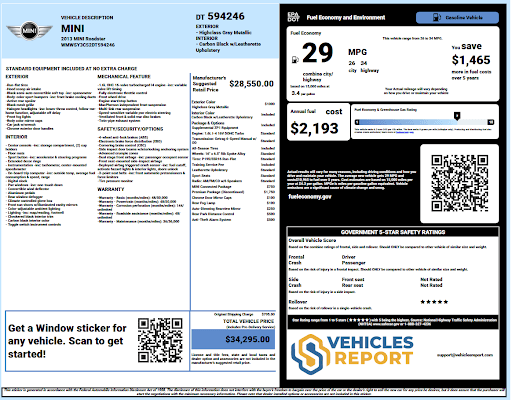
What is a MINI Window Sticker?
A MINI window sticker is the official label placed on every new MINI before it leaves the dealership. It comes straight from the factory and lists everything the car includes, from the trim level and color to the optional packages and the price the manufacturer set.
For anyone buying or selling a used MINI, getting the window sticker by VIN is one of the most useful references you can have. It tells you exactly how the car was built and what it cost when it was brand new, so there are no surprises about what features should or should not be on the vehicle.
Who Can Benefit from a MINI Window Sticker Search?
Anyone connected to a used MINI, whether buying, selling, or insuring it, can use the window sticker lookup tool to make smarter decisions.
MINI Buyers
Buyers can confirm original factory features and make sure the asking price is fair.
MINI Owners
Owners can look up original specs and recall details for the car they already have.
Dealerships
Dealers can use original pricing data to help set accurate resale values on inventory.
Insurance Providers
Insurers can verify factory-installed safety features to calculate the right coverage rates.
What Can You Learn from a MINI Window Sticker Lookup?
Every MINI window sticker by VIN lookup pulls the original factory build information for that specific car, giving you a complete overview of how it was built.Here’s what to expect:
General Information
This section covers the basic identity details tied to that specific vehicle from the factory.
Vehicle Description
This shows the exact year, make, model, and trim level the car was produced as. It helps to know which features came standard or also added separately.
Standard Equipment
Standard equipment lists everything that came included with the car at no extra cost from the factory.
Interior Features
Covers what came inside the car from the factory, including seating material, dashboard layout, infotainment system, climate controls, and storage.
Exterior Features
Exterior features include items like roof rails, body trim, mirror type, window style, and wheel design.
Mechanical Features
Here, you will see details on the engine, drivetrain, battery type, suspension setup, steering system, brakes, and exhaust configuration.
Safety Features
Factory safety equipment is listed here, including airbags, stability control, backup sensors, camera systems, and driver assistance features.
Options and Packages
This section shows everything that was added to the car beyond the standard trim equipment at the factory.
Options
Individual options are features the original buyer chose to add on their own, like a sunroof, upgraded audio, or sport seats.
Packages
Packages bundle several related features together and MINI packages often group things like tech upgrades, comfort additions, or visual styling.
Colors
The colors section records the official factory-chosen paint and interior finish for that specific car.
Exterior Color
The exterior color listed here is the exact factory paint color name chosen when the car was ordered.
Interior Color
This shows the factory finish for the seats, trim, and cabin panels. This helps flag any non-original upholstery or trim that may have been swapped out.
Vehicle Pricing
The pricing section breaks down every cost that went into the original sticker price of the vehicle.
MSRP
The Manufacturer Suggested Retail Price is the base price MINI set for the model and trim before any options were added.
Packages and Options
Every package and option ordered adds to the sticker price. This section shows each individual add-on cost.
Original Shipping Charge
This is the destination charge MINI added to cover transporting the vehicle from the factory to the dealership.
Total Vehicle Price
The total price is the full sticker amount: base MSRP plus all added options, packages, and the shipping charge.
Fuel and Safety Ratings
These ratings come from federal agencies and give buyers a clear look at how the car performs in terms of efficiency and safety.
EPA Fuel Economy Estimates
The EPA rates every car for city, highway, and combined fuel usage. See the miles the car is expected to travel per gallon under typical driving conditions.
NHTSA Safety Ratings
The National Highway Traffic Safety Administration tests new vehicles for crash protection and gives scores on a five-star scale.
Warranty Information
Warranty details on the sticker show the original coverage terms that came with a new MINI purchase.
Basic Warranty
Covers most vehicle components for a set period after the original sale date.
Corrosion Perforation Warranty
Protects the body panels from rust-through damage for a longer term.
Powertrain Warranty
Covers the engine, transmission, and core drivetrain components specifically.
Roadside Assistance Coverage
MINI includes roadside help coverage that runs alongside the new vehicle warranty period.
Other Information
The MINI window sticker includes a few extra pieces of useful information worth knowing.
EPA Annual Fuel Cost
This figure shows roughly how much you would spend on fuel driving the car for a full year under typical conditions.
Greenhouse Gas Rating
This rating shows how much carbon dioxide the vehicle releases compared to other cars in its class. A higher score means fewer emissions.
Fuel Type
The sticker clearly lists whether the vehicle runs on regular gasoline, premium fuel, or another energy source.
QR Code
The sticker includes a scannable QR code that links to the vehicle window sticker online.
The Benefits of MINI Window Sticker Lookup
Having access to the original window sticker gives you factual information that takes the guesswork out of the transaction. Here’s are some benefits to buyers and sellers:
Buyers
Buyers get a clear picture of what the car was before it ever hit the used market.
Verify Original Features
Confirm the car still has everything it left the factory with, from tech features to safety equipment.
Spot Missing Equipment
Compare what was factory-installed against what is physically on the car during inspection.
Negotiate with Real Numbers
Walk into any deal armed with original specs and pricing so you can make a fair offer.
Sellers and Dealers
Sellers and dealers who share the original window sticker build more trust with potential buyers.
Set a Justified Asking Price
Use original MSRP, equipment, and options to back up your listing price with real figures and data.
Build Buyer Confidence
Providing the original window sticker shows you have nothing to hide about the vehicle.
Speed up the Sales Process
Buyers who have all the factory details upfront spend less time asking questions and move faster.
How to Get Window Stickers for MINI Cooper and Other Models
Getting a MINI Cooper window sticker or for other MINI models takes just a few steps and only under a minute of your time. Here’s how to do it:
Enter the VIN
Find your 17-digit VIN and enter it into the form at the top of the page. You can also get the window sticker using the year, make and model, or license plate.
Search VIN
Hit the search button to decode the VIN and pull up the factory records tied to that specific MINI VIN number. Preview specs like year, make, and engine for free.
Get Your MINI Window Sticker
After payment, your MINI window sticker will show up immediately, ready to view, download, save, or print right away as a PDF.
Enter the VIN
Find your 17-digit VIN and enter it into the form at the top of the page. You can also get the window sticker using the year, make and model, or license plate.
Search VIN
Hit the search button to decode the VIN and pull up the factory records tied to that specific MINI VIN number. Preview specs like year, make, and engine for free.
Get Your MINI Window Sticker
After payment, your MINI window sticker will show up immediately, ready to view, download, save, or print right away as a PDF.
Where Can I Find My MINI VIN Number?
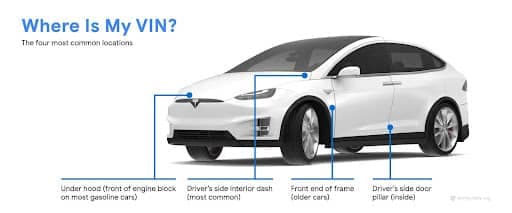
Your MINI VIN number appears in several places on the vehicle and in the vehicle paperwork. Check these common locations for the VIN:
- Driver Side Dashboard (Windshield Base): Stand outside the vehicle and look through the bottom left corner of the windshield. The VIN plate is stamped there and readable without opening the car.
- Driver Side Door Jamb: Open the driver’s door and check the sticker on the edge of the door or the door frame. It lists the VIN along with tire pressure and weight information for the vehicle.
- Under the Hood: Pop the hood and look at the front strut tower or the firewall area. Many MINI models have a VIN plate stamped into the metal here as an additional reference point.
- Vehicle Documents: The VIN is printed on the title, registration, and insurance cards that should come with any used MINI purchase.
What MINI Models Do We Support?
We support the full lineup across every generation of MINI sold in the US. Here are some popular models.
Find Original Window Stickers for Other Makes
Looking for a window sticker for a different brand? Select from a wide range of vehicle makes we cover below:
Explore Other Related MINI VIN Tools
Beyond the window sticker, these tools allow you to dig even deeper into any MINI vehicle history, recalls and more.
MINI VIN Decoder
Decode any MINI VIN to verify specs such as the year, make, model, engine, transmission, and more.
MINI Vehicle Recall
Check if a MINI has any open safety recalls that need immediate attention.
Classic MINI Window Sticker
Dig up the original build sheet by VIN for any vintage or classic MINI vehicle.
License Plate Lookup
Check any license plate number to access detailed vehicle history instantly.
Look Up any MINI Window Sticker by VIN Now
Get the original factory details for any MINI in seconds. Enter the VIN to see pricing, features, options, colors, fuel economy, safety ratings, and the complete build data.
Frequently Asked Questions About MINI Window Stickers
Can I look up a window sticker for a used MINI Cooper?
Yes. With the 17-character VIN, you can pull up the original MINI Cooper window sticker regardless of how old the car is to see the factory options, MSRP, colors, and full list of equipment that came with the car when it left the factory.
What does the MINI window sticker tell me?
The MINI window sticker shows the original factory build for that specific car, including the trim level, standard equipment, added options, paint and interior colors, MSRP, shipping charge, fuel economy, and NHTSA crash test ratings.
Where is the VIN located on a MINI Cooper?
The most common spot is the base of the windshield on the driver’s side, visible from outside. You can also find it on the driver’s door jamb sticker, under the hood, or on any official vehicle documents like the title or registration.
Is the window sticker the same as a vehicle history report?
No, they are different. The window sticker shows the original factory build and pricing. A vehicle history report covers what happened after the car was sold, including ownership records, accident history, title information, and more.
Why does the window sticker matter when buying a used MINI?
A MINI window sticker lookup helps you confirm the car has the features it was built with. You can easily catch dishonest sellers who list features that were never factory-installed.