
See Every Factory Option Associated With Your VIN
What did a vehicle actually come with from the factory? Enter the VIN, get a window sticker, and see its original options, packages, features, and more. Quickly compare the factory build with what you're seeing on the vehicle or in the seller's listing.
What Are Car Options and Packages?
When a vehicle is built, it can come with standard equipment included with the trim and optional equipment that was added for an extra cost.
Car options
Car options are individual features added to a vehicle beyond its standard configuration. These can include upgraded wheels, premium audio, heated seats, navigation, advanced safety features, or other equipment.
Packages
Packages group several related options together. For example, a manufacturer may offer a Technology Package that combines navigation, premium audio, a head-up display, and other technology features.
Two vehicles with the same trim can have different factory equipment. A VIN lookup helps you see what your vehicle originally came with.
What Does an Options by VIN Check Show?
A vehicle options by VIN check helps you see the factory equipment and packages associated with a specific vehicle. The available information can vary by make, model, model year, and available factory data.
Factory Options and Packages
- Premium packages
- Technology packages
- Sport packages
- Tow packages
- Off-road packages
- Appearance packages
- Cold-weather packages
- Performance packages
Comfort and Convenience Features
- Heated or ventilated seats
- Leather seating
- Power seats
- Sunroof or panoramic roof
- Power liftgate
- Remote start
- Keyless entry
Technology Features
- Navigation
- Premium audio systems
- Head-up displays
- Wireless charging
- Advanced infotainment systems
- Digital instrument displays
Safety and Driver Assistance
- Adaptive cruise control
- Blind-spot monitoring
- Lane-keeping assistance
- Parking sensors
- Surround-view cameras
- Driver-assistance packages
Exterior and Appearance Options
- Factory wheel upgrades
- Special paint
- Appearance packages
- LED or adaptive lighting
- Roof options
- Sport appearance equipment
Performance and Utility Options
- Performance packages
- Sport suspension
- Upgraded brakes
- Trailer or towing equipment
- Off-road equipment
- Drivetrain-related options
Why Check Your Vehicle's Options by VIN?
A VIN options lookup can be useful when the vehicle's appearance, listing, or seller description does not give you the complete picture. Here’s why you need to check:
Buyers
Verify advertised features
Use an options by VIN search to compare the vehicle's factory equipment with the features listed by the seller.
Compare similar vehicles
Two vehicles can have the same year, model, and trim while having different factory packages and optional equipment.
Know what you're paying for
Check for valuable factory upgrades before deciding how much a used vehicle is worth to you.
How to See Car Options by VIN
You can check car options by VIN in a few simple steps.
Find Your VIN
Locate the vehicle's 17-character VIN. You can usually find it on the dashboard, driver's-side door jamb, title, registration, or insurance card.
Enter Your VIN
Enter the VIN into the lookup tool above. Make sure all 17 characters are correct before submitting your search.
Review the Results
Your results can show available factory options, packages, features, and other original vehicle information associated with the VIN.
Find Your VIN
Locate the vehicle's 17-character VIN. You can usually find it on the dashboard, driver's-side door jamb, title, registration, or insurance card.
Enter Your VIN
Enter the VIN into the lookup tool above. Make sure all 17 characters are correct before submitting your search.
Review the Results
Your results can show available factory options, packages, features, and other original vehicle information associated with the VIN.
Need Help?
Having trouble finding your VIN or understanding your results? Send a message on live chat for assistance.
Popular Car Brands and Their Common Options
Factory options vary between manufacturers, models, trims, and model years. Select a brand to see commonly associated options and packages.
Toyota
Use the VIN rather than the trim name alone to identify equipment on a specific Toyota.
Ford
Especially useful when comparing used Ford trucks and SUVs with different equipment.
Chevrolet
A VIN check helps confirm which equipment belongs to the specific Chevrolet.
BMW
Especially useful when comparing used BMWs that look similar but differ in equipment.
Mercedes-Benz
Checking the specific vehicle is more reliable than assuming trim implies identical equipment.
Tip: Package names and available features change between model years and models. Use the VIN to check the specific vehicle instead of assuming an option was included based on the trim alone.
Factory Options vs. Dealer-Installed Accessories
A VIN options check focuses on the vehicle's original factory configuration. Equipment added after the vehicle left the factory may not appear in the results.
Factory Options | Dealer-Installed Accessories |
|---|---|
Installed during vehicle production | Added after production |
Included in the original factory configuration | Added by a dealer or installer |
Can appear in VIN options data | May not appear in a VIN options check |
Factory sunroof | Aftermarket sunroof |
Factory wheels | Dealer-installed wheels |
Factory audio system | Upgraded stereo installed later |
Factory bed equipment | Dealer-installed spray-in bedliner |
In short: A VIN options check tells you how the vehicle was originally built, not everything that may have been added to it later.
What Factory Options by VIN Cannot Confirm
A VIN options check shows the vehicle's original factory configuration. It does not confirm everything that may have changed or been added since the vehicle was built.
Aftermarket Changes
Custom wheels, exhausts, stereos, or suspension upgrades may not appear.
Dealer-Installed Accessories
Items such as spray-in bedliners, running boards, or aftermarket sunroofs may be missing from the original data.
Current Condition
A factory option does not confirm that the feature is still installed, functional, or in its original condition.
Replacements & Repairs
Original equipment may have been replaced, removed, or damaged over time.
Previous Owner Additions
Accessories or upgrades added after purchase generally won't be part of the factory configuration.
Accident-Related Changes
A VIN options check does not confirm if factory equipment was replaced, removed, or changed after an accident or major repair.
Where to Find the VIN on Your Vehicle
- Driver-Side Dashboard: Look through the windshield from outside the vehicle. The VIN is commonly displayed on a plate at the lower corner of the dashboard.
- Driver's-Side Door Jamb: Open the driver's door and look for the manufacturer's label or vehicle information sticker. The VIN is commonly printed there.
- Under the Hood: Some vehicles have the VIN stamped or displayed on a component under the hood, such as the engine compartment or firewall.
- Vehicle Title: The VIN is listed on the vehicle's title and can be used to verify that the number matches the vehicle.
- Registration: Check the registration document for the vehicle's identification number.
- Insurance Card: Your insurance documents may also list the VIN.
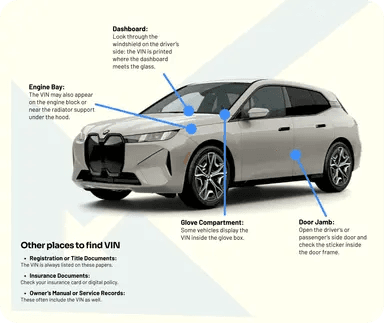
If you cannot find the VIN, contact the vehicle owner, dealer, or your insurance provider for assistance.
What Types of Vehicles Can You Check?
You can use an options lookup to research many types of vehicles, including:
Get More than Vehicle Options With a Window Sticker
Searching options from VIN focuses on factory equipment, but vehicle information can go beyond options and packages. A window sticker gives access to original factory specs, including:
Original MSRP
See the vehicle's original manufacturer's suggested retail price and, where available, the pricing associated with factory options.
Total Vehicle Price
See the original total price of the vehicle, including the base price, factory options, packages, and other listed charges when available.
Standard Equipment
Review equipment that was included as standard with the vehicle's original trim, including mechanical, interior, and exterior equipment.
Factory Options
See available factory-installed options, packages, and upgrades included in the original build.
Exterior and Interior Colors
Check the original factory exterior and interior colors associated with the vehicle. This can help confirm the vehicle's original appearance and configuration.
Vehicle Specifications
Review available specifications such as the engine, transmission, drivetrain, body style, and other factory details.
Fuel Economy
View original fuel economy information, including city, highway, and combined ratings when available.
Warranty Information
Review available manufacturer warranty information associated with the original vehicle.
Other Vehicle Checks You Can Run
Need more information about the same vehicle? Explore these related tools from VehiclesReport.
VIN Decoder
Decode the vehicle's core specifications, including year, make, model, engine, trim, and other available details.
License Plate Lookup
Don't have the VIN? Use a license plate lookup to research a vehicle using its plate number and state.
VIN Recall Check
Check for reported recalls associated with the vehicle and identify safety issues that may require attention.
Classic VIN Check
VehiclesReport supports specialized VIN decoding for classic vehicles, including older VIN formats.
Why Choose Vehicles Report?
We help you see what a vehicle actually came with from the factory, from options and packages to MSRP, colors, and equipment. Here are some reasons to choose us:
Detailed History Reports
Go beyond factory options with available accident, title, mileage, and ownership records.
Auction History & Photos
Compare the original build with available auction history and photos.
Free VIN Decoder
Verify basic vehicle specifications before purchasing.
Multiple Data Sources
Bring available factory and vehicle information together.
Affordable Reports
Get original build information without premium pricing.
Built for Businesses
Research multiple vehicles with bulk options.
Ready to Check Your Vehicle's Factory Options?
Find out what a specific vehicle came with from the factory in just a few seconds. Enter its VIN to see available options, packages, and features associated with the original configuration.
FAQs on Vehicle Options by VIN
What is an options by VIN lookup?
An options by VIN lookup uses a vehicle's VIN to identify available factory options, packages, and equipment associated with that specific vehicle. The available level of detail depends on the make, model year, VIN, and available data.
How can I see car options by VIN?
To check car options by VIN, enter the vehicle's 17-character VIN into the options lookup tool. The results can show available factory packages, features, and optional equipment associated with the vehicle.
Can I look up car options by VIN?
Yes. You can lookup vehicle options by VIN to research the original factory configuration of a specific vehicle.
Can two cars with the same trim have different options?
Yes. Two vehicles with the same year, model, and trim can have different factory packages and optional equipment. This is one reason a VIN lookup is useful when comparing vehicles.
Does an options lookup show aftermarket modifications?
Generally, no. A factory options lookup is intended to show the vehicle's original factory configuration. Aftermarket parts or modifications added after production may not appear in the original factory data.
Can I check options on a used car?
Yes. A used vehicle can still be researched using its VIN. Checking the original options can help you compare the vehicle's factory configuration with its current equipment and the seller's description.
What if I cannot find my vehicle's options?
Available option information varies by vehicle. If your results do not contain the information you expected, contact support for help understanding the available data or exploring another vehicle lookup.