
Vehicle Accident History Check by VIN
A vehicle can look great and still have accident or damage records in its past. Run an accident check by VIN to find reported accidents, damage events, and other history before you buy.
What Is a Vehicle Accident History Report?
A vehicle accident history report shows reported accidents and damage events associated with a vehicle's VIN. Depending on the available records, it can help you see when an incident occurred, the type of damage reported, and other details connected to the event.
The FTC recommends getting a vehicle history report before buying a used car while also using a test drive and inspection as part of your research. A vehicle accident history check gives you another way to investigate a car before making a purchase.
Why Check a Vehicle for Accidents?
Accident history is more common than many buyers realize.
40%
Vehicles With Reported Damage
Up to 40% of vehicles on the road have sustained damage.
1 in 4
Used Cars With Damage
About 1 in 4 used cars for sale has damage history.
$1,700
Average Value Impact
Severe damage can reduce retail value by about $1,700.
How to Check a Vehicle for Accident Records
Checking a vehicle's accident history takes only a few steps. All you need is the VIN.
Enter the VIN
Find the vehicle's 17-character VIN and enter it into the search form. Check each character carefully before submitting. You can also search by license plate number.
Run the VIN Search
Submit the VIN to check for accidents and search available vehicle history records connected to it.
Review the Accident Report
Review the available accident, damage, title, and other vehicle history records. Look at the dates and details of reported events before deciding what to do next.
Enter the VIN
Find the vehicle's 17-character VIN and enter it into the search form. Check each character carefully before submitting. You can also search by license plate number.
Run the VIN Search
Submit the VIN to check for accidents and search available vehicle history records connected to it.
Review the Accident Report
Review the available accident, damage, title, and other vehicle history records. Look at the dates and details of reported events before deciding what to do next.
Need Help?
Having trouble? Double-check the 17-character VIN and each character, then contact our support team if you still need help.
Why Check a Vehicle for Accidents?
An accident check can help you understand a vehicle's past before making a purchase or putting it up for sale.
Buyers
Spot Hidden Damage
Find reported accidents and damage that may not be obvious during a quick inspection.
Know the Vehicle's Past
Review accident events and other records before deciding if the car is right for you.
Avoid Costly Surprises
Identify serious damage or title issues before spending your money.
Negotiate With Confidence
Use the vehicle's history to ask better questions and negotiate a fair price.
What Does an Accident History Check Show?
An accident report by VIN can provide useful information about reported accidents and damage connected to a vehicle.
Here are some of the details you can find:
Accident Events
See reported accident or damage events associated with the vehicle.
Event Dates
See when reported accidents or damage events occurred, when available.
Damage Information
Review available descriptions or indicators showing the type of damage reported
Accident Location
See the location associated with an accident record when available.
Record Source
See the source associated with each accident or damage record when available.
Use Case: See What Maya Discovered Before Buying
Maya was considering a used 2015 Toyota Corolla and wanted to know more about its past before making an offer. Rather than relying only on the seller's description, she decided to check the vehicle's VIN through VehiclesReport.
Here’s What She Found
- ⚠️ Title Brand: The vehicle has a salvage title.
- ⚠️ Accident Records: 3 accident records were found.
- ⚠️ Damage Records: 2 damage records were found.
- ⚠️ Event Records: 1 specific event was reported.
- ⚠️ Auction / Sales: 1 auction record was found.
- ⚠️ Open Recalls: 2 open recall records were found.
- ✅ Odometer Check: No mileage discrepancy was found.
- ✅ Service & Repair: No service or repair records were found.
- ✅ Lien / Loan: No lien or loan records were found.
- ✅ Theft Records: No stolen or theft records were found.
Result: With this information in hand, Maya had specific questions to bring back to the seller — about the salvage title, the accident history, and the open recalls — before deciding whether to move forward.
What Should You Do If an Accident Is Found?
Finding an accident record does not automatically mean you should walk away from the vehicle. The important thing is to understand what happened and how the vehicle was repaired.
1. Ask the Seller for Details
Ask the seller what happened and request any available accident or repair documentation.
2. Check the Damage
Review the report to understand what type of damage was reported and when it occurred.
3. Inspect the Vehicle
Have an independent mechanic inspect the vehicle for signs of previous damage and repair quality. Afterwards, take it out for a test drive.
4. Check for Title Brands
Look for salvage, rebuilt, flood, or other title brands that could indicate more serious previous damage.
5. Consider the Price
If the vehicle has documented accident history, use the information when evaluating its condition and negotiating the price.
Can a Car Have an Accident Without Showing It on a Report?
Yes. A vehicle history report cannot guarantee that every accident will appear.
Accidents or repairs that were never reported to a participating source may not appear in the available records. Not all accidents and issues are reported to government databases.
That is why a car accident history check should be used as one part of your research, not as a replacement for inspecting the vehicle.
Where Does Vehicle Accident Data Come From?
Vehicle history information can come from multiple reporting sources. Federal NMVTIS records, for example, receive selected information from state motor vehicle agencies, insurance carriers, salvage yards, junk yards, and auto recyclers.
Vehicles Report combines available records to help you review a vehicle's documented history in one place. The information available can vary by vehicle and reporting source.
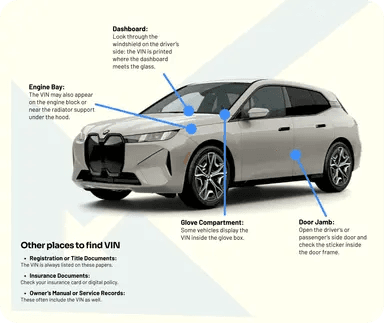
Common VIN Locations: Where to Find the VIN
The VIN is the unique 17-character identifier assigned to most modern vehicles.
Here’s where you can look:
- Driver's side dashboard: Look through the windshield near the bottom corner.
- Driver's side door jamb: Check the label or plate around the door opening.
- Vehicle title: Look for the VIN on the title document.
- Registration: The VIN is usually printed on registration paperwork.
- Insurance card: Your insurance documents may also show the VIN.
Accidents Are Not the Only Red Flags. Check These Records Too
An accident history by VIN search is only one part of researching a used vehicle. A full vehicle history report can provide additional information about the car's past.
Vehicle Usage History
See available records showing how the vehicle was used, including rental, commercial, fleet, or personal use.
Ownership and Registration History
Review recorded ownership changes and registration locations to get a clearer picture of the vehicle's history.
Lien and Loan Records
See available lien information connected to the vehicle before completing a purchase.
Mileage and Odometer Records
Compare reported mileage entries and look for inconsistencies that may require further investigation.
Title Brand and Salvage Records
Check for salvage, rebuilt, flood, junk, and other reported title brands and verify roadworthiness.
Theft History
Check for theft records and see if a vehicle was officially recovered (if stolen) in the past.
Previous Sales Listings
Review available past sales and listing information to understand how the vehicle has been presented and sold in the past.
Auction Records and Photos
Access available auction history and real auction photos when records are present. These photos can provide additional clues about the vehicle's condition.
Vehicle Recalls
Check for reported recalls that may affect the vehicle and require attention.
Service and Maintenance Records
Review available service and maintenance records to see how the vehicle has been cared for over time.
Get More Information With Vehicles Report’s Tools
Explore more vehicle research tools to check important details before buying, selling, or registering a vehicle.
Window Sticker Lookup
Find original factory details such as MSRP, equipment, trim, and specifications when available.
License Plate Lookup
Use a license plate to access available vehicle history information.
Recall Check
Check for reported recalls and identify potential safety issues that may need attention.
Classic VIN Lookup
Check history records for older vehicles with VIN formats that predate the standard 17-character system.
Why Choose Vehicles Report?
We make it easier to investigate a vehicle's past by bringing accident records together with damage, title, auction, and other available history. Here are some reasons to choose us:
Detailed History Reports
Review available accident, damage, title, mileage, ownership, and other records.
Auction History & Photos
See previous auction records and photos when available.
Free VIN Decoder
Preview basic vehicle information before buying a full report.
Multiple Data Sources
Access available history compiled from multiple data sources.
Affordable Reports
Check vehicle history at a lower cost than major alternatives.
Built for Businesses
Run VIN checks in volume with business-friendly options.
Don't Buy Blind. Check For Accident Records First!
A clean-looking vehicle can still have accident or damage records hidden in its past. Run a VIN check for accidents, review the available history, and know more before you pay.
FAQs About Vehicle Accident History
How to check for car accident history?
You can check the VIN number for accidents by entering the vehicle's 17-character VIN into a vehicle history search. Review the available accident and damage records before buying.
Can I get an accident report by VIN?
Yes. An accident report by VIN can show available accident and damage records associated with a vehicle. The information available depends on the records reported for that VIN.
Can I check a VIN for accidents for free?
No. Some services offer basic VIN information for free, but detailed accident and vehicle history reports may require payment. VehiclesReport's VIN check page provides basic vehicle information at no cost, while the full vehicle history report provides additional records.
Does every accident appear on a VIN report?
No. Not every accident is reported to vehicle history databases. An accident that was handled privately or never reported to a participating source may not appear. Use the report together with a physical inspection and test drive.
Does an accident history mean I should not buy the car?
Not necessarily. The severity of the accident, type of damage, quality of repairs, title status, and current condition all matter. Ask for repair records and have the vehicle inspected before making a decision.
Is accident history the same as a salvage title?
No. An accident record simply indicates that an accident or damage event was reported. A salvage title is a specific title designation applied under applicable state rules. A vehicle can have an accident record without having a salvage title. NMVTIS defines salvage vehicles based on applicable legal and damage criteria.
What is a vehicle accident report by VIN?
A vehicle accident report by VIN is a vehicle history report that uses the VIN to identify available records related to accidents and damage. It may include event dates, damage information, title records, and other related history when available.
How can I check my car's accident history by VIN?
Enter the VIN into the search form to run an accident history by vin search. Review the available records and compare them with the seller's description, repair documents, and the vehicle's current condition.
Should I get a mechanic's inspection after checking the VIN?
Yes. A vehicle accident history check can help you identify reported events, but it cannot replace a physical inspection. A mechanic may find repairs or damage that are not included in the available vehicle history records.